The OxiDB time series engine: Gorilla compression, rollups and block-level retention
A deep dive into oxidb-tsdb, OxiDB's time series engine: Gorilla compression bit by bit, typed fields, line protocol, aggregations, continuous rollups with a watermark, low-lock backup and real compression ratios measured on my own sensor data.
Picture a cold storage warehouse with ten temperature sensors, each reporting once a second. That is 864,000 points a day and 315 million a year. You could store every one of them as a JSON document, and OxiDB's document engine would happily do it, but every document would repeat the same measurement name, the same tags and the same field names, at a cost of more than a hundred bytes per point. The information a point actually carries is a timestamp and a number. That is why I wrote a separate time series engine for OxiDB: oxidb-tsdb. This post covers what it is for, how to enable it, the data model, Gorilla compression bit by bit, queries and aggregations, continuous rollups, retention and backup. Every output shown here comes from a real oxidb-server 0.44.2 that I ran for this post on my own machine (Apple M4, local), and the compression ratios were measured on sensor data I generated.
Why a separate engine?
Time series data has three defining traits. Its shape never changes: same measurement, same tags, same fields, forever. Its timestamps are regular: a collector that writes once a second writes roughly every 1000 ms. Its values change slowly: a temperature is usually either identical to the previous reading or differs in the last digit. On top of that the data is almost always appended, and queries ask about ranges and summaries rather than individual points: "the per-minute mean over the last hour", "today's p95".
The document model cannot exploit any of that, because its flexibility comes from attaching a schema to every document. Columnar storage removes exactly that repetition: the field name is written once in the series identity, and the values become an anonymous, uniformly typed stream. Similar values sitting next to each other is what compression loves most.
Like the SQL engine, oxidb-tsdb is a separate Rust crate that runs inside the same process but has its own directory, file format and query surface. It is off by default and costs nothing until you turn it on.
Enabling it
One environment variable does it:
OXIDB_ADDR=127.0.0.1:15500 \
OXIDB_DATA=./data \
OXIDB_TSDB=1 \
OXIDB_HTTP_PORT=15501 \
./oxidb-server
The engine is built lazily, and on the first TSDB request the server logs:
[oxidb] TSDB engine enabled (default db at ./data/tsdb)OXIDB_TSDB_DATA moves the default database's TSDB directory elsewhere. Like the SQL engine, it is per database: the default database lives under $OXIDB_DATA/tsdb, a named metrics database under $OXIDB_DATA/metrics/tsdb. You can even switch the document engine off entirely (OXIDB_DOC=0) and run the process as a SQL and TSDB server only.
The wire protocol is the one OxiDB uses for every engine: a 4-byte little-endian length prefix followed by JSON. A request adds "engine": "tsdb", every request uses cmd: "tsdb", and an op field picks the action: write, write_lp, query, distance, track, stats, retention, checkpoint, rollup_add, rollup_refresh, rollups. In RBAC terms the Read role can only run queries; writes, retention and rollup definitions need ReadWrite.
In the examples I use the low-level _request call of the Python client from the repo. There is no TSDB-specific helper yet, and none is needed:
from oxidb import OxiDbClient

db = OxiDbClient(host="127.0.0.1", port=15500)

def tsdb(op, **kw):
    return db._request({"engine": "tsdb", "cmd": "tsdb", "op": op, **kw})
The data model: measurements, tags, fields
It is InfluxDB's model. A point has four parts: a measurement name, zero or more tags (all strings), one or more fields (the measured values) and a timestamp in milliseconds.
Tags are identity: which site, which room, which sensor. You filter and group by them. Fields are data. Internally the engine enforces this split strictly:
One series = measurement × (sorted) tag set × field name.
So the point coldroom,site=izmir,room=r1 temp=3.9,door_open=f carries two fields and becomes two separate series: coldroom|room=r1,site=izmir|temp and coldroom|room=r1,site=izmir|door_open. Tags are sorted by key, so the same tag set lands in the same series no matter what order it was written in.
Typed fields
Fields are typed: float, integer, boolean and string. The three numeric types share the Gorilla path and are all stored as f64 internally (integers are exact up to 2^53, booleans are 0/1), but the type is remembered per series and reported back as "type" in query results. Strings take a separate path as raw (timestamp, text) pairs.
When writing JSON, the JSON value decides the type: true/false is boolean, a whole number is integer, a string is string, anything else is float. Two points in one request:
{"engine": "tsdb", "cmd": "tsdb", "op": "write", "points": [
  {"measurement": "coldroom", "tags": {"site": "izmir", "room": "r1"},
   "fields": {"temp": 3.8, "door_open": false, "compressor_rpm": 2950, "state": "cooling"},
   "ts": 1790812800000},
  {"measurement": "coldroom", "tags": {"site": "izmir", "room": "r2"},
   "fields": {"temp": 4.1, "door_open": true, "compressor_rpm": 3010, "state": "defrost"},
   "ts": 1790812800000}]}
{"ok": true, "data": {"written": 2}}InfluxDB line protocol
The lingua franca of metrics is InfluxDB's line protocol; collectors such as Telegraf speak it, and the engine ingests it directly. Suffixes set the type: 3.9 float, 2940i integer, t/f/true/false boolean, "..." string. The timestamp is in milliseconds (InfluxDB defaults to nanoseconds, so watch out); without one, the server's current time is used. Spaces and commas can be escaped with a backslash (us\ midwest).
{"engine": "tsdb", "cmd": "tsdb", "op": "write_lp",
 "lp": "coldroom,site=izmir,room=r1 temp=3.9,door_open=f,compressor_rpm=2940i,state=\"cooling\" 1790812860000\ncoldroom,site=izmir,room=r2 temp=4.4,door_open=t,compressor_rpm=3050i,state=\"defrost\" 1790812860000\ncoldroom,site=ankara,room=r1 temp=2.7,door_open=false,compressor_rpm=2800i,state=\"cooling\" 1790812860000"}
{"ok": true, "data": {"written": 3}}A few queries to see the types come back. Latest temperature grouped by site and room:
{"engine": "tsdb", "cmd": "tsdb", "op": "query", "measurement": "coldroom", "field": "temp",
 "group_by": ["site", "room"], "agg": "last"}
{"ok": true, "data": [
{"tags": {"site": "ankara", "room": "r1"}, "type": "float", "points": [{"ts": 1790812860000, "value": 2.7}]},
{"tags": {"site": "izmir", "room": "r1"}, "type": "float", "points": [{"ts": 1790812800000, "value": 3.9}]},
{"tags": {"site": "izmir", "room": "r2"}, "type": "float", "points": [{"ts": 1790812800000, "value": 4.4}]}]}Compressor RPM reports as integer and the door as boolean, and the mean of a boolean is simply "the fraction of time the door was open":
compressor_rpm, tags={"site":"izmir"}, agg=max
{"tags": {}, "type": "integer", "points": [{"ts": 1790812800000, "value": 3050.0}]}

door_open, group_by=["room"], agg=mean
{"tags": {"room": "r1"}, "type": "boolean", "points": [{"ts": 1790812800000, "value": 0.0}]}
{"tags": {"room": "r2"}, "type": "boolean", "points": [{"ts": 1790812800000, "value": 1.0}]}

state, agg=distinct
{"tags": {}, "type": "string", "points": [{"ts": -4611686018427387904, "value": 2.0}]}
There are two rough edges in these outputs and I would rather show them than hide them. First, a query without an interval stamps its single bucket with the timestamp of the earliest point in it: above, last correctly returns 3.9 but pairs it with the first point's time. Second, the string query path still leaks the "unbounded range" sentinel that I fixed on the numeric path: if you do not pass a start, the timestamp comes back as i64::MIN/2. The value is right, the timestamp is meaningless; it is a small bug that needs fixing, and passing a start makes it go away.
Gorilla compression
The heart of the engine is gorilla.rs. It is named after the in-memory time series database Facebook described at VLDB in 2015, and the idea has two legs: encode timestamps as delta-of-delta and values as XOR. A block is self-describing: [u32 count][i64 t0][f64 v0][bitstream], a 20-byte header followed by a bit-packed body. The body holds all timestamps first, then all values.
Timestamps: delta-of-delta
A sensor that writes once a second has consecutive differences (deltas) of 1000; the difference of the differences (dod) is zero. A single 0 bit encodes zero. Otherwise the value is zigzag-encoded and falls into a variable-width bucket:
| dod range | Prefix | Payload | Total |
|---|---|---|---|
| 0 | 0 | none | 1 bit |
| -64 .. 63 | 10 | 7 bits | 9 bits |
| -256 .. 255 | 110 | 9 bits | 12 bits |
| -2048 .. 2047 | 1110 | 12 bits | 16 bits |
| anything else | 1111 | 64 bits | 68 bits |
One subtlety: the first delta is encoded against a "previous delta" of zero. In a 1-second series the first dod is 1000 and costs 16 bits; in a 10-second series it is 10,000, which exceeds 2047 and costs 68 bits. It is paid once per block, so it does not matter.
Values: XOR
The bit patterns of two consecutive f64 values are XORed. If the value did not change, the XOR is zero and a single 0 bit is written. If it did, the meaningful window of the XOR (after the leading zeros, before the trailing zeros) is stored. If the previous window covers the new XOR (at least as many leading and at least as many trailing zeros), the window description is skipped: 1 (changed), 0 (same window) and the meaningful bits. Otherwise it writes 1, 1, a 5-bit leading-zero count, a 6-bit window length and the window itself.
A worked example, bit by bit
Rather than leave this abstract, I traced a five-point series by hand. Timestamps are 0, 1000, 2000, 3003, 4000 ms (the fourth reading arrives 3 ms late), values are 21.5, 21.5, 21.75, 21.5, 22.0. I ported the encoder in gorilla.rs line by line to Python, wrote the same series to the real server, ran a checkpoint, then parsed blocks.43.tsb and pulled out the block the server produced:
values (hex bits):
    21.5 = 4035800000000000
    21.5 = 4035800000000000
   21.75 = 4035c00000000000
    21.5 = 4035800000000000
    22.0 = 4036000000000000
trace:
   ('ts', 1000, 1000, 1000, '1110 011111010000')
   ('ts', 2000, 1000, 0, '0')
   ('ts', 3003, 1003, 3, '10 0000110')
   ('ts', 4000, 997, -6, '10 0001011')
   ('val', 21.5, '0000000000000000', '-', '0')
   ('val', 21.75, '0000400000000000', 'new lead=17 trail=46 m=1', '1 1 10001 000000 1')
   ('val', 21.5, '0000400000000000', 'reuse lead=17 trail=46', '1 0 1')
   ('val', 22.0, '0003800000000000', 'new lead=14 trail=47 m=3', '1 1 01110 000010 111')
bitstream: 69 bits -> 9 bytes; block = 20 header + 9 = 29 bytes (raw 5x16 = 80)
python block: 0500000000c4c2f4a00100000000000000803540e7d041a16e206ee0b8
server block: 0500000000c4c2f4a00100000000000000803540e7d041a16e206ee0b8 min 1790812800000 max 1790812804000 count 5
IDENTICAL: True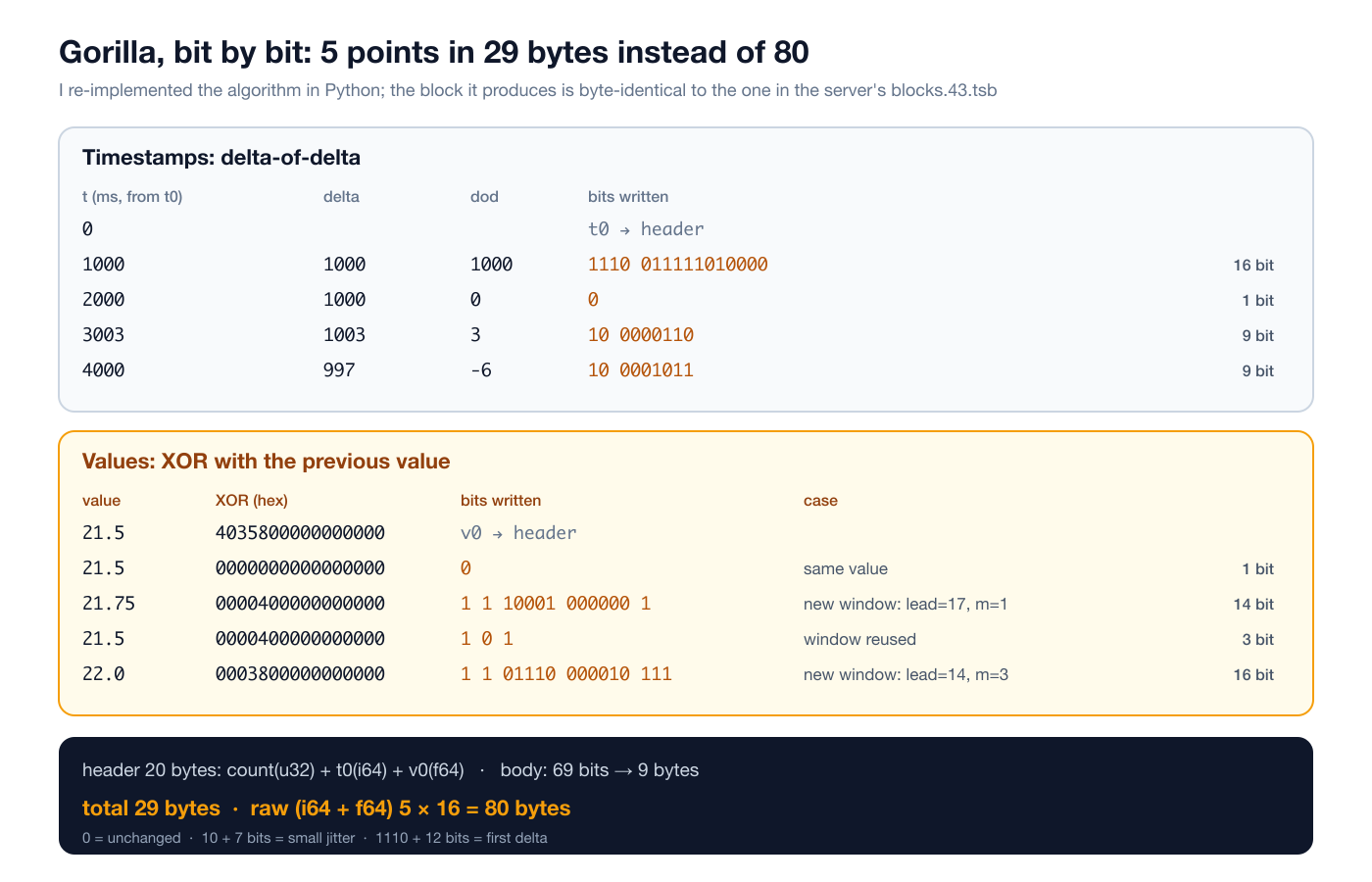
Reading it line by line:
- The first delta is 1000, and since the previous delta counts as 0, so is the dod. It falls into the -2048..2047 bucket: the
1110prefix plus the zigzag of 1000 (2000, in 12 bits:011111010000). 16 bits. - The second point is on time: dod 0, one bit.
- The 3 ms delay is paid twice: first the delta becomes 1003, so dod is +3 (
10+ zigzag(3)=6); then the next delta drops to 997, so dod is -6 (10+ zigzag(-6)=11). 9 bits each. The measurements below show why jitter is expensive. - The second value is unchanged: a single
0bit. - 21.75: its XOR with 21.5 is
0000400000000000. One bit is set: 17 leading zeros, 46 trailing, a 1-bit window. There is no previous window, so the description is written:1 1 10001 000000 1, 14 bits. - Back to 21.5: same XOR, the window covers it and is reused:
1 0 1, only 3 bits. - 22.0: XOR
0003800000000000, leading zeros drop to 14, the old window no longer covers it, so a new one is written: 16 bits.
That is 35 bits of timestamps and 34 bits of values, 69 bits, rounded up to 9 bytes. With the header it is 29 bytes; raw (i64 + f64) it would be 80. With five points the header dominates; the real win shows up in 1024-point blocks, where the header shrinks to 0.16 bits per point.
I picked values like 21.5, 21.75 and 22.0 that are exact in binary. A real temperature sensor sends 3.8 and 3.9, whose XOR is 0001555555555555: a 49-bit window. Decimal fractions have infinite binary expansions, and that inflates the XOR. The measurements below show how much that matters in practice.
The real compression ratio, on my own sensor data
The book in the repo and examples/ratio.rs quote about 0.28 bytes per point (roughly 56x over raw binary) for a rounded gauge that holds its value for long stretches. That is the project's own measurement; I wanted to see different data shapes rather than the friendly case. I generated ten sensors, one day, one sample per second (864,000 points per shape), wrote them through line protocol in batches of 10,000 lines, ran a checkpoint and measured the change in the compressed byte count reported by stats. For reference I also compressed the same data as columnar raw binary (all timestamps, then all values) with zlib level 6.
| Data shape | Compressed | Bits/point | vs raw binary | gzip -6 |
|---|---|---|---|---|
| boolean door, rare changes | 238,066 B | 2.2 | 58.1x | 6.3x |
| integer humidity (%) | 409,529 B | 3.8 | 33.8x | 5.7x |
| temperature, float, 0.1 resolution | 1,142,690 B | 10.6 | 12.1x | 5.8x |
| same temperature, ±5 ms timestamp jitter | 1,955,295 B | 18.1 | 7.1x | 5.4x |
| integer counter (monotonic) | 1,933,080 B | 17.9 | 7.2x | 3.6x |
| float, full-precision noise | 6,150,471 B | 56.9 | 2.2x | 1.6x |
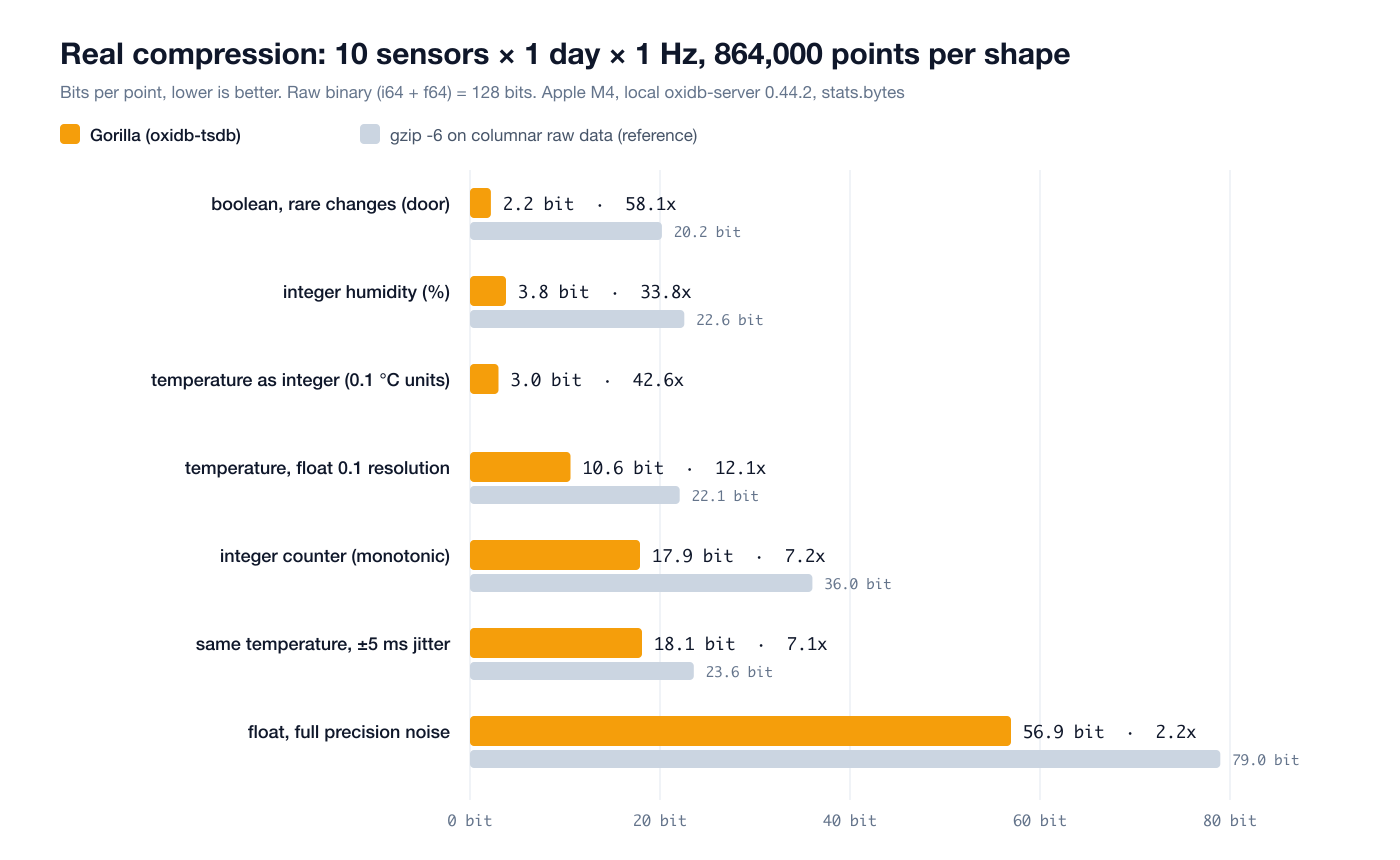
A few lessons fall out of this table:
- Rarely changing data is almost free. The door sensor costs 2.2 bits per point: 1 bit of time, usually 1 bit of value. 58x over raw binary.
- Decimal floats are expensive. The 0.1-resolution temperature costs 10.6 bits per point. In the random walk I generated, the value changes on about 16% of points, and each change writes an XOR window of about 49 bits.
- Storing the same data as integers is 3.5x better. I tested this separately: the same temperature series, generated from the same seed, written once as floats like
3.8and once as integers in units of 0.1 °C like38i. The float version took 1,132,370 bytes (10.5 bits/point, 12.2x), the integer version 324,259 bytes (3.0 bits/point, 42.6x). Integers have zeros in the low mantissa bits of theirf64pattern, so the XOR window stays narrow. If your sensor's resolution is fixed, write it in integer units. - Timestamp jitter matters as much as value compression. Adding nothing but ±5 ms of timestamp noise to the same temperature data added 7.5 bits per point. Having the collector round timestamps to its own tick (a whole second, say) buys a lot.
- Counters land in the middle. Every value of a monotonic counter differs and its magnitude keeps changing, so XOR can only do so much. 17.9 bits.
- Noise gets no miracle. On full-precision random floats Gorilla stops at 2.2x, though even there it beats gzip.
In every case Gorilla beats general-purpose gzip, because it knows the data. For comparison, the same point as a JSON document took 107 to 122 bytes, and as line protocol text 55 to 70 bytes. All six shapes together were 5,184,000 points and 11.8 MB of compressed data; the blocks.43.tsb file on disk was 12.2 MB (the difference is the series key repeated in every block record).
A note on write speed: from a single Python connection, in batches of 10,000 lines and including Python's own data generation, it ingested between 150,000 and 220,000 points per second. That is not a benchmark, just the number I saw while running these experiments.
Inside: blocks, the active buffer and the WAL
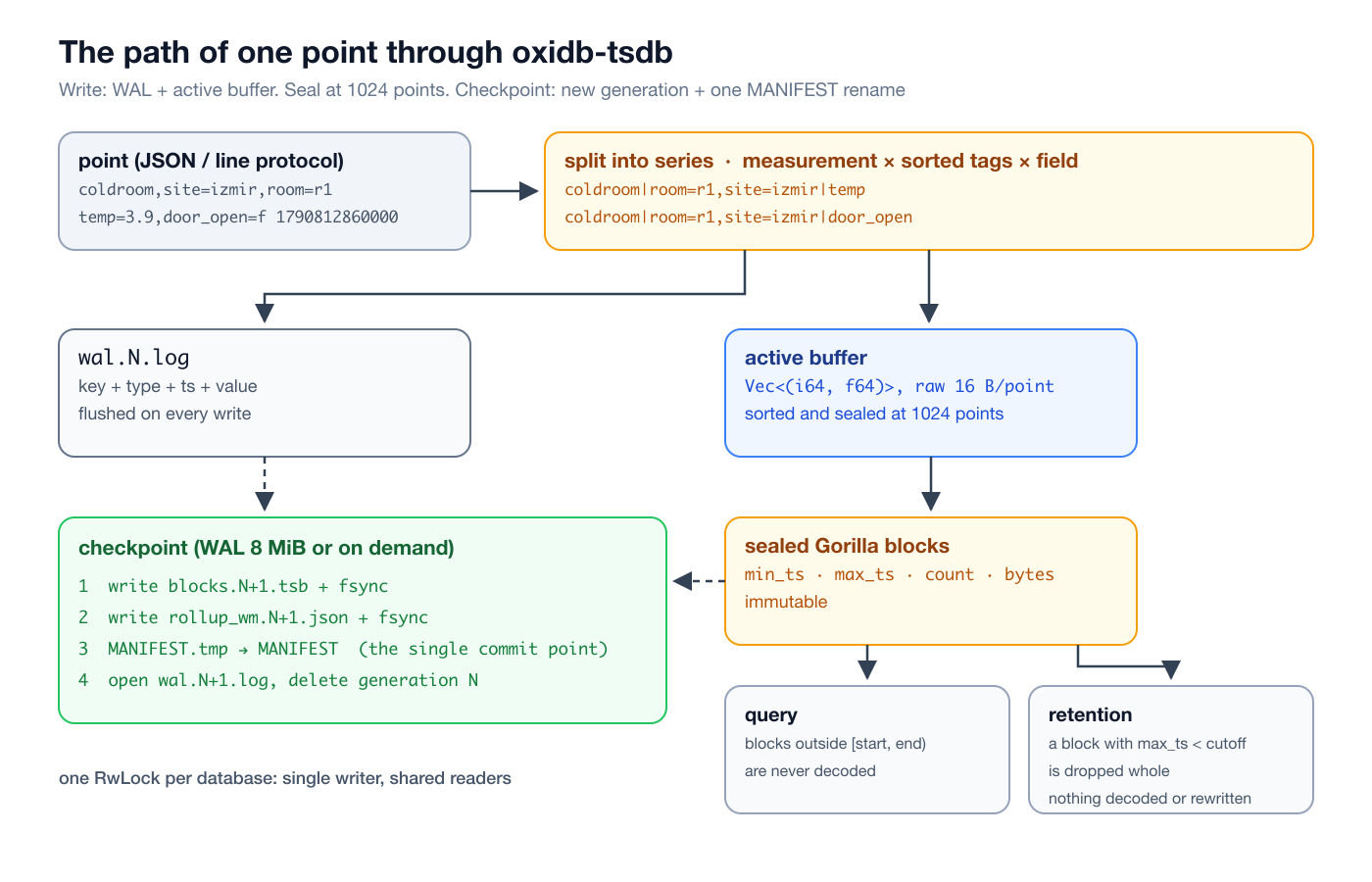
A series has two parts: sealed blocks and an active buffer. An incoming point is appended to the WAL first, then pushed into the series' buffer (a Vec<(i64, f64)>). When the buffer reaches 1024 points it is sealed: sorted by time, Gorilla-encoded and turned into a Block with min_ts, max_ts and count. Blocks never change after that.
Three consequences follow:
- Query pruning. A range query never decodes blocks that do not overlap
[start, end). On the 864,000-point temperature data I measured a median of 0.19 ms for a one-minute window and 13.1 ms for the whole day (where all 864,000 points are decoded). - Retention is free. Expiring data is not a point-by-point rewrite; it drops whole blocks from a list.
- Out-of-order writes are accepted. Sorting happens within a block at seal time; overlapping blocks do not break query correctness, they only weaken pruning and compression.
Block size is a trade-off: bigger blocks compress better but coarsen the resolution of retention and pruning. The default of 1024 is a reasonable middle; at the crate level it can be changed with with_block_points.
Durability: the MANIFEST is the single commit point
The on-disk layout looks like this:
<dir>/MANIFEST              {"generation": N}, the authoritative generation
<dir>/blocks.<N>.tsb        full block snapshot at checkpoint N
<dir>/wal.<N>.log           points written after N
<dir>/rollup_wm.<N>.json    rollup watermark, same generation
<dir>/rollups.json          rollup rules
A checkpoint runs in this order: seal the active buffers, write blocks.<N+1>.tsb and fsync it, write the watermark to rollup_wm.<N+1>.json and fsync it, write MANIFEST.tmp and atomically rename it over MANIFEST, open a fresh wal.<N+1>.log and delete generation N's files.
The whole durability argument sits on either side of that single rename. A crash before it leaves MANIFEST at N; recovery reads the old snapshot and its WAL, which still holds every point written since that checkpoint. A crash after it makes recovery read the new snapshot and ignore the old WAL; no point is counted twice. The engine checkpoints on its own once the WAL passes 8 MiB (writing a day of data took my generation number to 43), and the checkpoint op triggers one on demand. The SQL engine uses the same "rewrite the generation, promote it with one rename" approach.
One thing I have to be honest about: the WAL is flushed to the operating system at the end of every write request but not fsynced. A process crash loses nothing (I tested with kill -9 below), because the written data sits in the kernel's page cache. A power failure, however, can lose some of the points written since the last checkpoint. That is a deliberate speed trade-off for metrics data, but one you should know about.
Concurrency and memory
Each database's engine sits behind an RwLock: writes go one at a time, queries run concurrently under a shared lock. Sealed blocks live in memory; Tsdb::open loads the whole snapshot. Memory use is therefore roughly the compressed data size. The 5.2 million points above take 12 MB; a year of one 1 Hz series would be about 40 MB as 0.1-resolution floats, or about 12 MB in integer units. It is not the right tool for an archive of billions of points; it is built for hot data and rollups that fit in RAM.
Queries and aggregations
A query names the measurement, the field, tag filters (tags, equality only), a half-open time range [start, end), an optional bucket width (interval, in ms), tags to group by (group_by) and an aggregation (agg, default mean). The response is always a list of groups, each with its tags, the field type and its points.
| Aggregation | Meaning |
|---|---|
mean / avg | average |
sum | total |
min / max | smallest / largest |
count | number of points |
first / last | oldest / newest value in the bucket |
distinct | number of distinct values |
rate | change per second: (last - first) / span_s, for counters |
percentile + p | p-th percentile, linear interpolation (like numpy's default) |
p50, p95, p99, p99.9 | shorthand for percentile |
Group by time
With an interval, buckets are aligned to the epoch (as in InfluxDB), so hourly buckets land on whole hours. The hourly mean of one sensor over its first four hours:
{"engine": "tsdb", "cmd": "tsdb", "op": "query", "measurement": "s_temp_01", "field": "temp",
 "tags": {"sensor": "s00"}, "start": 1790812800000, "end": 1790827200000,
 "interval": 3600000, "agg": "mean"}
{"ok": true, "data": [{"tags": {}, "type": "float", "points": [
{"ts": 1790812800000, "value": 2.734611111111113},
{"ts": 1790816400000, "value": 2.2817499999999957},
{"ts": 1790820000000, "value": 1.3479722222222226},
{"ts": 1790823600000, "value": 2.0618055555555315}]}]}Grouping by tag and time together produces one line per chart series in a single query. Six-hour maximums for ten sensors (start of the output):
{"tags": {"sensor": "s00"}, "type": "float", "points": [{"ts": 1790812800000, "value": 3.8}, {"ts": 1790834400000, "value": 6.0}]},
{"tags": {"sensor": "s01"}, "type": "float", "points": [{"ts": 1790812800000, "value": 5.5}, {"ts": 1790834400000, "value": 5.4}]},
{"tags": {"sensor": "s02"}, "type": "float", "points": [{"ts": 1790812800000, "value": 6.0}, {"ts": 1790834400000, "value": 5.3}]},
...
tags filters series, group_by splits the output; they can be combined.
Percentiles, rate and the rest
Percentiles over a full day for all ten sensors (864,000 points). They need to sort the values, so each took about 16 ms:
agg=p50                 -> 3.2
agg=p95                 -> 5.7
agg=p99                 -> 5.9
agg=percentile, p=99.9  -> 6.0
rate is for monotonic counters: it divides the difference between a bucket's first and last value by the time between them. Packets per second from the packet counter, in 15-minute buckets (I generated 40 to 60 packets a second, so around 50 is expected):
{"engine": "tsdb", "cmd": "tsdb", "op": "query", "measurement": "s_counter", "field": "packets",
 "tags": {"sensor": "s03"}, "start": 1790812800000, "end": 1790816400000,
 "interval": 900000, "agg": "rate"}
{"ok": true, "data": [{"tags": {}, "type": "integer", "points": [
{"ts": 1790812800000, "value": 49.88320355951057},
{"ts": 1790813700000, "value": 49.809788654060064},
{"ts": 1790814600000, "value": 49.88987764182425},
{"ts": 1790815500000, "value": 49.77641824249166}]}]}The remaining aggregations over an hour of humidity data, each around 0.1 ms:
count    -> 3600.0
first    -> 75.0
last     -> 76.0
min      -> 73.0
sum      -> 269640.0
distinct -> 5.0
rate does not know about counter resets; if a counter resets within a bucket you will see a negative or low value. There is no reset correction like Prometheus' rate().
Geo tracks
Store a position as two numeric fields written with the same timestamps (lat, lon) and the engine offers two extra queries: distance (path length in meters, haversine) and track (a Douglas-Peucker simplified track). A four-point truck track in Izmir:
>>> {"op": "distance", "measurement": "truck", "tags": {"id": "t7"}}
<<< {"ok": true, "data": [{"tags": {}, "type": "float", "points": [{"ts": 1790900060000, "value": 3423.2779930961387}]}]}

>>> {"op": "track", "measurement": "truck", "tags": {"id": "t7"}, "tolerance": 50}
<<< {"ok": true, "data": [{"tags": {"id": "t7"}, "points": [
     {"ts": 1790900000000, "lat": 38.4237, "lon": 27.1428},
     {"ts": 1790900120000, "lat": 38.4363, "lon": 27.1572},
     {"ts": 1790900180000, "lat": 38.45, "lon": 27.16}]}]}
The collinear second point was dropped at a 50-meter tolerance. Document-side geo queries are in the series' geospatial and graph post.
Raw TCP and PostgREST
The protocol is simple enough that you do not need a library at all. The same engine also speaks PostgREST's grammar over HTTP: an Accept-Profile: tsdb header routes the request to the TSDB engine, select names the field, tag=eq.value filters, ts=gte. and ts=lt. set the range. Hourly maximum with curl:
curl -s 'http://127.0.0.1:15501/rest/v1/s_temp_01?select=temp&sensor=eq.s00&ts=gte.1790870400000&ts=lt.1790881200000&interval=3600000&agg=max' \
-H 'Accept-Profile: tsdb'[{"ts":1790870400000,"value":4.2},{"ts":1790874000000,"value":6.0},{"ts":1790877600000,"value":6.0}]Writes take a flat object; string values become tags, numbers become fields:
curl -s -i -X POST 'http://127.0.0.1:15501/rest/v1/coldroom' \
  -H 'Content-Profile: tsdb' -H 'Content-Type: application/json' \
  -d '{"ts":1790899200000,"site":"izmir","room":"r3","temp":3.6}'
HTTP/1.1 201 CreatedThat is why the @supabase/postgrest-js client works unmodified with .schema('tsdb'). PATCH and DELETE deliberately return 405: the series store is append-only, and data is removed with retention.
Continuous rollups and the watermark
Storing a year of per-second data is cheap; scanning millions of points every time a chart renders is not. The standard answer is continuous aggregation: compute summaries of closed time buckets once and store them. In oxidb-tsdb a rollup rule says "summarize every numeric series of this measurement in buckets of this width with these aggregations"; the result is a derived measurement named <measurement>@<label> with fields <field>_<agg>, carrying the source series' tags unchanged.
>>> {"op": "rollup_add", "measurement": "s_temp_01", "label": "1m", "interval": 60000, "aggs": ["mean", "min", "max", "count"]}
<<< {"ok": true, "data": {"ok": true}}

>>> {"op": "rollups"}
<<< {"ok": true, "data": [{"measurement": "s_temp_01", "label": "1m", "interval": 60000}]}

>>> {"op": "rollup_refresh", "now": 1790899200001}
<<< {"ok": true, "data": {"written": 14400}}
    (71.67 ms)

>>> {"op": "rollup_refresh", "now": 1790899200001}
<<< {"ok": true, "data": {"written": 0}}
Ten sensors × 1440 minutes = 14,400 rollup points in 72 ms. The second refresh writes nothing, because the start of the last materialized bucket is kept in a watermark for every (series, interval) pair. rollup_refresh only processes buckets that have fully closed: half of the current minute may not have arrived yet. Without now it uses the server clock; my test data is in the past, so I passed it explicitly.
The summary is an ordinary measurement and is read with an ordinary query:
s_temp_01@1m / temp_count, agg=sum   -> 864000.0
hourly mean raw    first 3: [2.7346, 2.2817, 1.348] 1.47 ms
hourly mean rollup first 3: [2.7346, 2.2818, 1.348] 0.17 ms
The hourly mean took 1.47 ms from raw data and 0.17 ms from the per-minute rollup, with the same results. One caveat: a mean of per-minute means is only exact when the buckets are equally full. With gaps it drifts slightly; if you need exactness, materialize sum and count and compute the ratio yourself. Chaining (1s → 1m → 1h) does not happen by itself; defining and refreshing the rules in order is up to the caller. Rules are written to rollups.json and survive restarts, but triggering refreshes is the application's job (or a scheduler's); the engine does not run them periodically on its own.
When is the watermark crash-safe?
The watermark is written with the same generation as the block snapshot (rollup_wm.<N>.json) and promoted atomically by the MANIFEST rename. The tests pin down "after a checkpoint, reopening never writes the same bucket twice". For this post I tried two scenarios with kill -9:
## scenario A: refresh, NO checkpoint, kill -9, restart
>>> {"op": "rollup_refresh", "now": 1790899380001}
<<< {"ok": true, "data": {"written": 3}}
   [kill -9, restart]
>>> {"op": "rollup_refresh", "now": 1790899380001}
<<< {"ok": true, "data": {"written": 14403}}
>>> {"op": "query", "measurement": "line_a@1m", "field": "v_mean", "agg": "count"}
<<< {"ok": true, "data": [{"tags": {}, "type": "float", "points": [{"ts": 1790899200000, "value": 6.0}]}]}

## scenario C: refresh + checkpoint, kill -9, restart
>>> {"op": "rollup_refresh", "now": 1790899380001}
<<< {"ok": true, "data": {"written": 3}}
>>> {"op": "checkpoint"}
<<< {"ok": true, "data": {"ok": true}}
   [kill -9, restart]
>>> {"op": "rollup_refresh", "now": 1790899380001}
<<< {"ok": true, "data": {"written": 0}}
>>> {"op": "query", "measurement": "line_c@1m", "field": "v_mean", "agg": "count"}
<<< {"ok": true, "data": [{"tags": {}, "type": "float", "points": [{"ts": 1790899200000, "value": 3.0}]}]}
Scenario C behaves as intended: the watermark reached disk with the checkpoint, so nothing was rewritten after the restart. Scenario A showed me a gap: rollup points go into the WAL and come back after the crash, but the watermark only becomes durable at a checkpoint. After the restart the watermark was stale, so the same buckets were written again (6 points instead of 3; the 14,400-point rollup from the earlier session, which had never been checkpointed, was duplicated as well). So the guarantee holds at the level of "checkpointed refreshes are never double-counted". The safe pattern today is simple: call checkpoint right after rollup_refresh. The real fix is to log the watermark update to the WAL as a record of its own; it is on my list.
Retention at block level
Retention works with a single cutoff: blocks whose newest point is older than the cutoff are dropped. I deliberately put the cutoff in the middle of a block, at 12:08:20:
>>> {"op": "query", "measurement": "s_temp_01", "field": "temp", "tags": {"sensor": "s00"}, "end": 1790856500000, "agg": "count"}
<<< {"ok": true, "data": [{"tags": {}, "type": "float", "points": [{"ts": 1790812800000, "value": 43700.0}]}]}

>>> {"op": "retention", "cutoff": 1790856500000}
<<< {"ok": true, "data": {"removed": 2584391}}
    (0.1 ms)

>>> {"op": "query", "measurement": "s_temp_01", "field": "temp", "tags": {"sensor": "s00"}, "end": 1790856500000, "agg": "count"}
<<< {"ok": true, "data": [{"tags": {}, "type": "float", "points": [{"ts": 1790855808000, "value": 692.0}]}]}
2.58 million points were gone in 0.1 ms, because nothing was decoded or rewritten; blocks were dropped from a list. 692 points older than the cutoff remained: they belong to the block that starts at 11:56:48 and extends past the cutoff. Retention resolution equals the block width, which for a 1 Hz series is 1024 points, about 17 minutes. Dropped blocks are not in the next snapshot, so retention becomes durable without any extra work.
Two limits to state plainly. The cutoff applies to the whole database: the same call also deleted the midnight points of the coldroom measurement (a later count came back empty). If you want different retention per measurement you have to put measurements in separate databases; for the classic "raw data for 7 days, rollups for a year" pattern that is a gap today. And retention does not run by itself either; calling it periodically is up to the application.
Low-lock backup and restore
A backup is a consistent .tar.gz of the engine's directory. The important part is that the slow work (compression) runs with the engine lock released. There are three phases:
- backup_begin (under the write lock, O(1)): the WAL is flushed, the current generation is "pinned" with a reference count, and the WAL's current length is recorded.
- backup_write (no lock): a synthesized MANIFEST, that generation's block file, the stable prefix of its WAL up to the recorded length, and the rollup files are written to the archive. A per-generation WAL is only ever appended to or rotated, so that prefix cannot change.
- backup_end (under the write lock, O(1)): the pin is released; if a checkpoint superseded the generation during the backup, its files are deleted now.
Writes and checkpoints carry on in between; a checkpoint never deletes a pinned generation's files. I measured it: one connection kept writing single points while another took a backup.
backup: {'ok': True, 'data': {'path': '.../backup/lowlock.tar.gz', 'size_bytes': 9531869}} took 860 ms
during backup   writes= 1482  p50=0.050 ms  p99=4.073 ms  max=10.486 ms
outside backup  writes= 3213  p50=0.060 ms  p99=4.082 ms  max=11.223 ms
Write latency is unaffected while the backup runs. The 5.3-million-point database archives to 9.5 MB; Gorilla blocks barely shrink under gzip because they are already compressed. Restore unpacks into an empty directory:
{"engine": "tsdb", "cmd": "backup", "path": "/backups/tsdb-2026-10-02.tar.gz"}
{"engine": "tsdb", "cmd": "restore", "archive": "/backups/tsdb-2026-10-02.tar.gz", "target": "/restore/tsdb"}
I started a second server on port 15510 with OXIDB_TSDB_DATA pointing at the restored directory; stats matched the pre-backup value exactly:
{"ok": true, "data": {"series": 114, "points": 5299594, "bytes": 12382229}}Restore does not overwrite the running engine; you open the engine on the new directory. A non-empty target directory is refused.
Time stages on the document side
Time series work in OxiDB is not limited to this engine. The document engine's aggregation pipeline has three time stages, and when event data already lives as documents they are often the right tool. On a six-trade trades collection:
$ohlcv turns ticks into candles; fill: "previous" fills the empty minute with the previous close:
{"$ohlcv": {"time": "ts", "interval": "1m", "price": "price", "volume": "qty", "symbol": "sym", "fill": "previous"}}
-> {"symbol": "ACME", "time": "2026-10-01T09:00:00Z", "open": 101.0, "high": 102.5, "low": 100.5, "close": 100.5, "volume": 6.0, "count": 3}
   {"symbol": "ACME", "time": "2026-10-01T09:01:00Z", "open": 100.0, "high": 100.0, "low": 99.5, "close": 99.5, "volume": 9.0, "count": 2}
   {"symbol": "ACME", "time": "2026-10-01T09:02:00Z", "open": 99.5, "high": 99.5, "low": 99.5, "close": 99.5, "volume": 0.0, "count": 0}
   {"symbol": "ACME", "time": "2026-10-01T09:03:00Z", "open": 101.5, "high": 101.5, "low": 101.5, "close": 101.5, "volume": 2.0, "count": 1}
$dateHistogram gives calendar-aware time buckets; min_doc_count: 0 emits the empty ones too:
{"$dateHistogram": {"field": "ts", "interval": "1m", "min_doc_count": 0, "accumulators": {"volume": {"$sum": "$qty"}}}}
-> {"_id": "2026-10-01T09:00:00Z", "count": 3, "volume": 6}
   {"_id": "2026-10-01T09:01:00Z", "count": 2, "volume": 9}
   {"_id": "2026-10-01T09:02:00Z", "count": 0}
   {"_id": "2026-10-01T09:03:00Z", "count": 1, "volume": 2}
$setWindowFields supports time-range windows: "the last 2 minutes", not "the last 5 documents":
{"$setWindowFields": {"sortBy": {"ts": 1}, "output": {"avg_2m": {"$avg": "$price", "window": {"range": [-2, 0], "unit": "minute"}}}}}
-> {"ts": "2026-10-01T09:00:05Z", "price": 101.0, "avg_2m": 101}
   {"ts": "2026-10-01T09:00:40Z", "price": 102.5, "avg_2m": 101.75}
   {"ts": "2026-10-01T09:00:55Z", "price": 100.5, "avg_2m": 101.33333333333333}
   {"ts": "2026-10-01T09:01:10Z", "price": 100.0, "avg_2m": 101}
   {"ts": "2026-10-01T09:01:30Z", "price": 99.5, "avg_2m": 100.7}
   {"ts": "2026-10-01T09:03:20Z", "price": 101.5, "avg_2m": 100.5}
Roughly: if events are rich, vary in shape or are few, use documents and these stages; if you have millions of numeric readings of the same shape, use the TSDB. The two work well together. In the repo's examples/coldchain demo, sensor readings arrive over MQTT, the numeric values go to the TSDB and the raw event exactly as the device sent it goes to the document engine: the time series shows the temperature climbing, the document shows why (door_open: true). The MQTT side is covered in the series' MQTT and AMQP post.
Limits and honest trade-offs
Here is what you should know before using this engine, in one place:
- It lives in memory. Sealed blocks are in RAM; memory use is roughly the compressed data size. Great for hot data and rollups, wrong for a multi-year raw archive.
- No tag index. A query walks every series key in the database and filters by measurement and tags. With a few thousand series you will not notice; high-cardinality tags (a user ID, say) grow both that scan and memory. Tags should come from a bounded set of values.
- Tag filters are equality only. No regex,
!=orIN. - One field, one aggregation. A query returns one field with one aggregation;
meanandmaxtogether are two queries. - Retention is database-wide, and neither rollup refresh nor retention runs automatically.
- The watermark is durable at checkpoints; checkpoint after a refresh.
- The WAL is not fsynced; safe against process crashes, but points since the last checkpoint are at risk on power loss.
- String fields are not compressed; they are stored as raw
(timestamp, text)pairs. - Not replicated in a cluster. In a Raft cluster, TSDB writes stay on the node that received them; ADR-0025 records this explicitly as a gap shared with the recommendation engine and expects both to be closed together.
- Timestamps are milliseconds. InfluxDB clients that send nanoseconds need their timestamps converted.
These are the limits of a deliberate scope rather than of an unfinished prototype: metrics data in a single process, fitting in memory, compressing well and queried fast. It does not try to replace an InfluxDB cluster. But when you want an application's metrics in the same binary as its documents, tables and cache, it saves you from running a second system.
Try it
Prebuilt OxiDB releases are on the GitHub releases page: macOS (arm64/x86_64), Linux (x86_64/arm64) and Windows binaries. To run it from the repo with Docker, docker compose up -d is enough. Enabling the time series engine takes nothing more than OXIDB_TSDB=1. If you want to repeat the measurement in this post with your own data, the easiest way is to write a day of data through line protocol and look at stats after a checkpoint: divide bytes by points and you see what you pay per point. And if your sensor's resolution is fixed, try writing the values in integer units; on my data the difference was 3.5x.
The next post in the series is OxiMem, the key-value engine that speaks the Redis protocol (the OxiMem post).