zap Components: A Small UI Kit Driven by Signals
A 3.7 KB core, zero dependencies, 57 components: a short look at how zap works with signals and how the components are used. All of them are live, with examples, at deck.kartex.net.
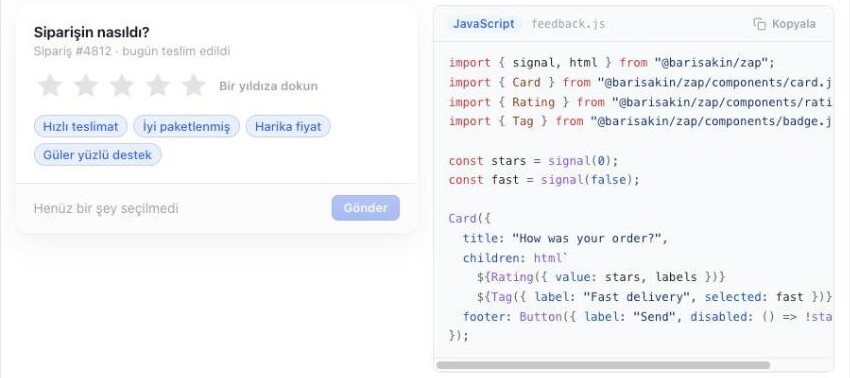
The small interactive pieces of this blog (the language switcher, the code viewer, the search palette) are written with zap. zap is a tiny, dependency-free JavaScript UI library built on signals, and a component kit that ships with it. I won't go through the components one by one here; all of them are live, with examples and code, at deck.kartex.net. This post is just a short summary of how the technology works and how you use it.
zap in short
- 3.7 KB core (gzip). No virtual DOM, no compiler, no mandatory build step.
- Zero dependencies. It runs in the browser as plain ES modules.
- 57 components: forms and inputs, overlays and feedback, navigation, display, data grids, charts, media.
- SSR and hydration: the same components render to HTML on the server and come alive in the browser. The 65 pages of the deck site are prerendered this way.
- Themes: CSS variables (
--zap-*) with Default, Emerald, Violet, Rosé and macOS Aqua themes, each with a dark mode. - Accessibility: roles, aria attributes, focus management and keyboard use in every component;
prefers-reduced-motionis respected.
Signals
The heart of zap is the signal. A signal is a function that holds a value; every place that reads it subscribes, and when the value changes only those places update. The component as a whole is never redrawn.
import { signal, computed, effect } from "@barisakin/zap";

const count = signal(0);
const double = computed(() => count() * 2);

effect(() => console.log("count", count(), "double", double()));

count.set(1);              // the effect runs again
count.update(n => n + 1);  // 2
untrack keeps a read out of the subscription, onCleanup tidies up before an effect reruns or a component goes away, and store gives field-level reactivity for nested objects.
html templates
Views are written with JavaScript's own tagged template literals. Anything passed into the template as a function (a signal or () => ...) is live; only that text node or attribute updates.
import { signal, html, mount } from "@barisakin/zap";

function Counter() {
  const n = signal(0);
  return html`
    <button onclick=${() => n.update(x => x + 1)}>
      clicked ${n} times
    </button>
  `;
}

mount(Counter, document.getElementById("app"));
when and each cover conditional and repeated content, and bind=${signal} ties an input to a signal both ways. A component is nothing more than a function of the form (props) => Node: no classes, no lifecycle methods, no special file format.
Using the components
Every component lives in its own module, so you only load what you use. Props can be plain values or signals; give a signal and the component both reads and writes it.
import { signal, html } from "@barisakin/zap";
import { Card } from "@barisakin/zap/components/card.js";
import { Rating } from "@barisakin/zap/components/rating.js";
import { Button } from "@barisakin/zap/components/button.js";
import { toast } from "@barisakin/zap/components/toast.js";

const stars = signal(0);

Card({
  title: "How was your order?",
  children: html`${Rating({ value: stars })}`,
  footer: Button({
    label: "Send",
    disabled: () => stars() === 0,
    onClick: () => toast.success("Thank you!"),
  }),
});
A dialog works the same way: open is a signal, set it to true and the dialog opens, close it and the signal goes back to false.
import { Modal } from "@barisakin/zap/components/modal.js";

const open = signal(false);
Modal({ open, title: "Delete it?", children: "This cannot be undone." });
open.set(true);
Dropdowns, tooltips, popovers and modals share two common layers (floating.js and overlay.js), so positioning, focus trapping, closing on Escape and scroll locking are solved in one place.
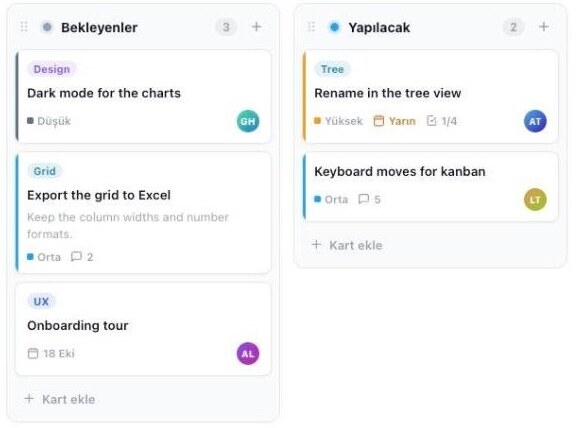
Data and charts
On the heavier side there is a data grid (virtual scrolling, sorting, filtering, grouping, editing), a scheduler, a kanban board, a tree and charts. The data you give a chart can be a signal; change it and the chart animates to the new values.
import { ColumnChart } from "@barisakin/zap/components/chart.js";

const data = signal([12, 19, 7, 24]);
ColumnChart({ labels: ["Q1", "Q2", "Q3", "Q4"], series: [{ name: "Sales", data }] });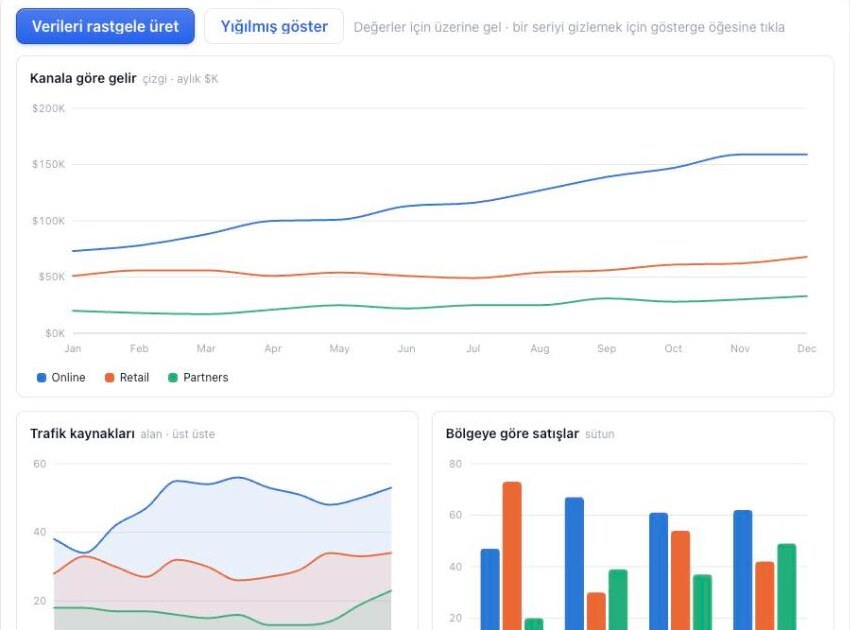
Router, i18n and SSR
- Router: a small router for navigating without page reloads (
Router,Link,navigate). - i18n:
t()for translations,setLocale()to switch languages; the components' own strings come ready in Turkish, English, German, French, Spanish and Montenegrin. - SSR:
renderToStringfrom@barisakin/zap/ssrturns the same component into HTML on the server; in the browserhydratereuses the existing DOM and wires up the events. - TypeScript: type definitions (
index.d.ts) ship with the package.
Installing
With npm:
npm install @barisakin/zapor straight from the CDN, with no tooling at all:
<link rel="stylesheet" href="https://zapjs.baltavista.com/theme.css">
<script type="module">
  import { signal, html, mount } from "https://zapjs.baltavista.com/zap.min.js";
</script>
Seeing them all
Every component, each with a live example, copyable code, and theme and dark mode switches, is at deck.kartex.net. If you want to know how to use a component, the quickest way is to look there: pick it from the left menu, try the example, copy the code.