S3-compatible object storage in OxiDB: aws-cli and boto3 connect unmodified
OxiDB's S3 layer: multipart, range and conditional reads, SSE-S3/SSE-C, SigV4 and presigned URLs, lifecycle expiry, how blobs sit on disk and full-text search inside uploaded files. All with real sessions.

As an application grows, the same guest always shows up next to the database: files. User avatars, PDF invoices, backups, log archives, blog images. Most teams stand up a separate object store for them (AWS S3, MinIO, Ceph) and before long they are managing backups, credentials, monitoring and upgrades for two systems instead of one. In OxiDB I decided to keep that guest in the same house: give the server an OXIDB_S3_PORT and it opens a listener that speaks the S3 HTTP API. aws-cli, boto3 and the MinIO SDKs connect without modification; you only point them at a different endpoint_url. This post covers what the layer does, how it works, how it lays objects out on disk and where it still falls short of S3, all with real sessions.
A small note first: the images on the blog you are reading live in exactly this layer. The blog server writes to a bucket called blog-media under keys like img/<uuid>.<ext> and signs its requests with a small SigV4 signer I wrote in Rill. Everything below is code that runs every day on the server delivering this page.
Why an S3 inside a database?
The S3 API has become the de facto language of object storage. Backup tools, CDNs, static site generators, ML pipelines: they all speak S3. So "OxiDB has its own blob commands" was not enough. Existing tools had to connect without any changes.
At the same time, keeping objects in a separate system has real costs:
- Two backups, two restore plans. The
ordersrow in the database and the invoice PDF in S3 are backed up at different moments and may not match after a restore. - Two authentication systems. Database users on one side, IAM keys on the other.
- Search is another world. Searching inside a PDF usually means a third system (Elasticsearch, OpenSearch) and an ETL pipeline.
In OxiDB the S3 layer is a thin HTTP shell over the core BlobStore. An object written with the native wire protocol's put_object command can be read through S3, and a PDF uploaded through S3 shows up in full-text search a few milliseconds later. Same data directory, same process, same backup.
Enabling and configuring it
The S3 layer is off by default; a port is all it takes to turn it on. For this post I started the server like this (OxiDB 0.44.2 on an Apple M-series Mac, everything local):
OXIDB_ADDR=127.0.0.1:15700 \
OXIDB_DATA=./data \
OXIDB_S3_PORT=15703 \
OXIDB_S3_CREDENTIALS="oxiadmin:oxisecret123,reader:readersecret456" \
OXIDB_S3_ENCRYPTION_KEY=000102030405060708090a0b0c0d0e0f101112131415161718191a1b1c1d1e1f \
OXIDB_BLOB_COMPRESS=1 \
./oxidb-server
The startup log says plainly what is on:
oxidb-server listening on 127.0.0.1:15700 (pool_size=4, data_dir=.../data, idle_timeout=0s)
[s3] authentication enabled (2 credential(s))
[s3] server-side encryption enabled (SSE-S3)
[s3] thread pool: 256 workers, queue depth 1024
S3-compatible API listening on 0.0.0.0:15703
The relevant environment variables:
| Variable | What it does |
|---|---|
OXIDB_S3_PORT | Port of the S3 HTTP listener. Unset means the layer is off. |
OXIDB_S3_ACCESS_KEY / OXIDB_S3_SECRET_KEY | A single key pair. |
OXIDB_S3_CREDENTIALS | Several pairs: ak1:sk1,ak2:sk2. Can be combined with the single pair. |
OXIDB_S3_ENCRYPTION_KEY | Server key for SSE-S3, 64 hex characters (32 bytes). |
OXIDB_S3_DEFAULT_ENCRYPTION | If true, every PUT without encryption headers is also encrypted with the server key. |
OXIDB_BLOB_COMPRESS | If 1, suitable objects are stored zstd-compressed. |
OXIDB_BLOB_SYNC | If 1, every PUT/DELETE is fsynced before it returns. |
A few details that matter:
- Without credentials the S3 API is open to everyone, and the server says so loudly:
[s3] WARNING: authentication DISABLED, S3 API is open to anyone!(the actual log line). I preferred noise over quietly leaving the door open. - The listener binds to
0.0.0.0, so locking the wire port to localhost withOXIDB_ADDRdoes not lock S3. In production, put it behind a firewall or a reverse proxy. - S3 is a document-backed listener. If you disable the document engine with
OXIDB_DOC=0and also setOXIDB_S3_PORT, the server refuses to start with "S3 buckets are stored as document-engine blobs". Some state, such as lifecycle rules, lives in document collections. - When multi-database support arrived I deliberately kept S3 buckets global (ADR-0012): S3 semantics have a single bucket namespace, and the S3 layer always writes to the default database (
data/oxidb/).
How does a bucket come to exist?
There is no separate bucket configuration. A bucket is created with PUT /bucket or simply by writing an object into it; BlobStore::put_object creates missing buckets on the fly. Bucket names are validated because they become directories on disk: .., / and even a bare . are rejected (. used to pass every check and resolve to the _blobs root; the fix is recorded in the CHANGELOG).
A first session with unmodified clients: aws-cli
aws-cli was not installed on the machine, so I installed it into a venv inside my working directory with pip install awscli boto3 (aws-cli 1.46.1, boto3 1.43). No plugins, no patches, only --endpoint-url.
export AWS_ACCESS_KEY_ID=oxiadmin AWS_SECRET_ACCESS_KEY=oxisecret123 AWS_DEFAULT_REGION=us-east-1
export EP=http://127.0.0.1:15703
echo "Merhaba OxiDB S3, bu bir deneme dosyasıdır." > hello.txt
aws --endpoint-url $EP s3 mb s3://photos
aws --endpoint-url $EP s3 cp hello.txt s3://photos/notes/hello.txt
aws --endpoint-url $EP s3 ls s3://photos --recursive
aws --endpoint-url $EP s3api head-object --bucket photos --key notes/hello.txt
md5 -q hello.txt
make_bucket: photos
upload: ./hello.txt to s3://photos/notes/hello.txt
2026-10-12 00:32:25 46 notes/hello.txt
{
"AcceptRanges": "bytes",
"LastModified": "Sun, 11 Oct 2026 21:32:25 GMT",
"ContentLength": 46,
"ETag": "\"87234ebddb79e0e7daed2faedcfc1f10\"",
"ContentType": "text/plain",
"Metadata": {}
}
87234ebddb79e0e7daed2faedcfc1f10Notice that the ETag is exactly the file's MD5. That looks like a small detail, but there is a story behind it, which I will get to. With a wrong secret key:
$ AWS_SECRET_ACCESS_KEY=wrong aws --endpoint-url $EP s3 ls s3://photos

An error occurred (AccessDenied) when calling the ListObjectsV2 operation: Access Denied
Object operations: Put, Get, Head, Delete, Copy
The supported surface is the part of S3 that applications actually use:
| Operation | HTTP | Notes |
|---|---|---|
| ListBuckets | GET / | |
| CreateBucket / DeleteBucket / HeadBucket | PUT, DELETE, HEAD /bucket | |
| ListObjectsV2 | GET /bucket?list-type=2 | prefix, delimiter, max-keys, continuation-token, start-after |
| PutObject | PUT /bucket/key | x-amz-meta-* user metadata, aws-chunked body decoding |
| GetObject | GET /bucket/key | Range, If-Match, If-None-Match, If-Modified-Since, If-Unmodified-Since |
| HeadObject | HEAD /bucket/key | |
| DeleteObject | DELETE /bucket/key | 204 even if missing (like S3) |
| DeleteObjects | POST /bucket?delete | batch delete |
| CopyObject | PUT + x-amz-copy-source | COPY/REPLACE metadata directive, conditional copy |
| Multipart | ?uploads, ?partNumber&uploadId, ?uploadId | initiate, upload part, complete, abort |
| Tagging | GET/PUT/DELETE ?tagging | |
| Lifecycle | GET/PUT/DELETE /bucket?lifecycle | Expiration/Days only |
Copy and tagging with aws-cli:
aws --endpoint-url $EP s3api copy-object --bucket photos --key archive/hello-copy.txt --copy-source photos/notes/hello.txt
aws --endpoint-url $EP s3api put-object-tagging --bucket photos --key notes/hello.txt \
    --tagging "TagSet=[{Key=project,Value=blog},{Key=lang,Value=tr}]"
aws --endpoint-url $EP s3api get-object-tagging --bucket photos --key notes/hello.txt
{
"CopyObjectResult": {
"ETag": "\"87234ebddb79e0e7daed2faedcfc1f10\"",
"LastModified": "2026-10-11T21:32:36Z"
}
}
{
"TagSet": [
{ "Key": "project", "Value": "blog" },
{ "Key": "lang", "Value": "tr" }
]
}Tags are not a separate structure; they live in the object's metadata with a tag- prefix. One side effect: a GET on the same object also returns them as user metadata headers like x-amz-meta-tag-project (you will see that in the range output below). Writing tags also rewrites the object, so LastModified changes. I kept it simple, but it is worth knowing.
aws-chunked: boto3's surprise
Modern aws-cli and boto3 send PUT bodies wrapped in "aws-chunked" framing by default: a hex size line before every chunk, optional checksum trailers at the end. Early versions did not decode that framing, so lines like 4000;chunk-signature=... ended up inside the stored object. The upload succeeded, an ETag came back, and the download was garbage. Now, whenever the request has content-encoding: aws-chunked or x-amz-content-sha256: STREAMING-*, the body is unwrapped, both for single PUTs and for multipart parts.
ListObjectsV2: prefixes, delimiters and continuation
Object stores have no folders, only keys that contain /. The folder illusion comes from the prefix and delimiter parameters. I uploaded three days of log files with boto3 and listed them:
import boto3
s3 = boto3.client("s3", endpoint_url="http://127.0.0.1:15703",
                  aws_access_key_id="oxiadmin", aws_secret_access_key="oxisecret123",
                  region_name="us-east-1")

s3.create_bucket(Bucket="logs")
for day in ("2026-10-10", "2026-10-11", "2026-10-12"):
    for i in range(4):
        s3.put_object(Bucket="logs", Key=f"app/{day}/part-{i}.log", Body=f"{day} line {i}\n".encode())
s3.put_object(Bucket="logs", Key="README.txt", Body=b"logs bucket")

r = s3.list_objects_v2(Bucket="logs", Delimiter="/")
print("top level  :", [c["Prefix"] for c in r.get("CommonPrefixes", [])], [o["Key"] for o in r.get("Contents", [])])
r = s3.list_objects_v2(Bucket="logs", Prefix="app/", Delimiter="/")
print("under app/ :", [c["Prefix"] for c in r.get("CommonPrefixes", [])])

page, token = 1, None
while True:
    kw = dict(Bucket="logs", Prefix="app/", MaxKeys=5)
    if token: kw["ContinuationToken"] = token
    r = s3.list_objects_v2(**kw)
    print(f"page {page}: KeyCount={r['KeyCount']} IsTruncated={r['IsTruncated']} "
          f"first={r['Contents'][0]['Key'] if r.get('Contents') else None} next={r.get('NextContinuationToken')}")
    if not r["IsTruncated"]: break
    token, page = r["NextContinuationToken"], page + 1
top level : ['app/'] ['README.txt']
under app/ : ['app/2026-10-10/', 'app/2026-10-11/', 'app/2026-10-12/']
page 1: KeyCount=5 IsTruncated=True first=app/2026-10-10/part-0.log next=app/2026-10-11/part-0.log
page 2: KeyCount=5 IsTruncated=True first=app/2026-10-11/part-1.log next=app/2026-10-12/part-1.log
page 3: KeyCount=2 IsTruncated=False first=app/2026-10-12/part-2.log next=NoneAs you can see, NextContinuationToken is not opaque: it is the last key returned. That is deliberate. Keys are sorted, so paging by "everything greater than the last key I saw" is more stable than paging by offset; an upload or delete between two pages cannot make a key appear twice or vanish. That is also why continuation-token and start-after behave the same.
The bug I found while writing this post
I wanted to try continuation on a larger bucket too. I uploaded 2500 objects (1.66 seconds with 32 threads) and listed them with boto3's own paginator:
pages = s3.get_paginator("list_objects_v2").paginate(Bucket="many")
counts = [p["KeyCount"] for p in pages]
print("pages:", counts, "total listed:", sum(counts))
put 2500 objects in 1.66s
pages: [1000, 1000, 0] total listed: 2000Only 2000 of the 2500 objects were listed. The cause is in bucket.rs: the S3 layer first fetches the first max_keys + 1000 keys from the core and only then applies the continuation-token filter. Nothing past the 2000th key ever arrives, the third page comes back empty with IsTruncated=false, and the client concludes the listing is complete. The fix is easy, because the core already has list_objects_from(bucket, prefix, after, limit); the S3 layer just needs to call it. Until the next release, do not trust a full listing of a bucket with more than 2000 objects. I would rather say this out loud than hide it; that is partly what this series is for.
Conditional and partial reads
GetObject supports ETag-based conditions. A caching client sends the ETag it already has in If-None-Match and gets a bodyless 304 when nothing changed:
head = s3.head_object(Bucket="logs", Key="README.txt")
etag = head["ETag"]
print("etag:", etag, "md5:", hashlib.md5(b"logs bucket").hexdigest())
s3.get_object(Bucket="logs", Key="README.txt", IfNoneMatch=etag)      # ClientError
s3.get_object(Bucket="logs", Key="README.txt", IfMatch='"deadbeef"')  # ClientError
s3.get_object(Bucket="logs", Key="README.txt", IfMatch=etag)["Body"].read()
etag: "4a88ebb9d3237052e83f9445adba8d2c" md5: 4a88ebb9d3237052e83f9445adba8d2c
If-None-Match same etag -> 304
If-Match wrong etag -> 412 PreconditionFailed
If-Match right etag -> b'logs bucket'Range requests work with bytes=a-b, bytes=a- and the suffix form bytes=-n; unsatisfiable ranges return 416. The first 7 bytes with aws-cli:
aws --endpoint-url $EP s3api get-object --bucket photos --key notes/hello.txt --range bytes=0-6 part.txt && cat part.txt{
"AcceptRanges": "bytes",
"ContentLength": 7,
"ETag": "\"87234ebddb79e0e7daed2faedcfc1f10\"",
"ContentRange": "bytes 0-6/46",
"ContentType": "text/plain",
"Metadata": { "tag-project": "blog", "tag-lang": "tr" }
}
MerhabaTwo honest caveats. First, a range read loads the whole object from disk (decrypting and decompressing it if needed) and then slices it; the last 1 MB of a 5 GB video still costs 5 GB of reading. Encryption and compression operate on the whole file, and without chunked AEAD there is no real seek. Second, If-Modified-Since and If-Unmodified-Since do not compare dates; they compare the HTTP date string for exact equality. That works for clients that echo back Last-Modified the way browsers do, but it cannot express "changed after this date". ETag-based conditions are complete.
Multipart uploads and the ETag story
aws-cli uploads files larger than 8 MB with multipart by default. A 20 MB random file:
head -c 20971520 /dev/urandom > big.bin
aws --endpoint-url $EP s3 cp big.bin s3://photos/videos/big.bin --only-show-errors
aws --endpoint-url $EP s3api head-object --bucket photos --key videos/big.bin --query "[ContentLength,ETag]" --output text
aws --endpoint-url $EP s3 cp s3://photos/videos/big.bin big.back --only-show-errors && cmp big.bin big.back && echo identical
20971520 "e90e5924e8af5f366537d93f2dfc780e-3"
identicalThe -3 at the end of the ETag says the object was uploaded in three parts (8 + 8 + 4 MB). S3 does not define a multipart object's ETag as the MD5 of the object: it concatenates the raw 16-byte MD5 digests of the parts, takes the MD5 of that, and appends -<part count>. OxiDB does exactly that, and returns each part's hex MD5 as the ETag of every part upload.
I learned why this matters the hard way. Single-part ETags used to be the first 16 bytes of a SHA-256. That is 32 hex characters, the same shape as an MD5. The AWS SDK for .NET computes the MD5 of what it sent and compares it to the ETag in the response; on mismatch it throws, assuming the upload was corrupted. A tag that looks like an MD5 but is not one turned out worse than a tag that looks like nothing: the client could not tell it was a scheme difference and concluded the data was damaged. Multipart part ETags were CRC32 for a while (8 hex characters instead of 32). Both now follow S3's definition, and the s3_etag.rs tests keep them there. MD5 is broken for signatures, but an ETag is not a signature; it identifies bytes.
Multipart has clear limits: at most 10,000 parts, 5 GiB total per upload, and incomplete uploads are cleaned up by a background thread after 24 hours. One important honesty note: in-flight parts are held in memory. If the server restarts, half-finished multipart uploads are lost (the client uploads again), and many concurrent large uploads raise RAM usage by the sum of their parts. For blog images and documents that is fine; for a multi-terabyte video archive, OxiDB S3 is not the right tool.
Lifecycle: expiring objects
For log and temp-file buckets, the most requested feature is automatic deletion of old objects. OxiDB supports the most commonly used subset of S3 lifecycle configuration: Expiration/Days.
s3.put_bucket_lifecycle_configuration(Bucket="secure", LifecycleConfiguration={
    "Rules": [{"ID": "expire-old", "Status": "Enabled", "Filter": {"Prefix": ""},
               "Expiration": {"Days": 30}}]})
print("lifecycle  :", s3.get_bucket_lifecycle_configuration(Bucket="secure")["Rules"])
lifecycle : [{'Expiration': {'Days': 30}, 'ID': 'secure-expiration', 'Status': 'Enabled'}]The rule is stored in a document collection called _s3_lifecycle, so it survives restarts and goes through the same WAL as the rest of OxiDB. A background sweeper reads every rule once every five minutes and deletes objects whose created_at is older than Days days.
To see it work without waiting 30 days, I cheated a little: in my own data directory I changed the created_at of the invoice.txt object's .meta file to 2026-08-01T09:00:00Z (meta files are plain JSON, more on that below), restarted the server and waited five minutes:
$ aws --endpoint-url $EP s3 ls s3://secure
2026-10-12 00:33:04         48 diary.txt
2026-08-01 12:00:00         54 invoice.txt
Five minutes later a single line appeared in the server log and the object was gone:
[s3] lifecycle expired 1 objects

$ aws --endpoint-url $EP s3 ls s3://secure
2026-10-12 00:33:04         48 diary.txt
Limits: one rule per bucket, the first <Days> value in the XML is used, Filter/Prefix and the rule ID are ignored (GET returns the ID as <bucket>-expiration), and there are no transitions or versioned-object rules.
Encryption: SSE-S3 and SSE-C
There are two independent encryption layers and they should not be confused:
- Encryption at rest (
OXIDB_ENCRYPTION_KEY): encrypts the whole OxiDB data directory with AES-256-GCM, including blob.dataand.metafiles. The S3 client never knows. - S3 server-side encryption (SSE): chosen per request with S3 headers.
With SSE-S3 the key belongs to the server (OXIDB_S3_ENCRYPTION_KEY) and the client only sends x-amz-server-side-encryption: AES256. With SSE-C the client sends the key with every request; the server never stores it, and without it the object cannot be read. For multipart uploads the SSE-C key stays in memory until completion and is then zeroed with write_volatile. Both modes use AES-256-GCM with a random 12-byte nonce per object.
r = s3.put_object(Bucket="secure", Key="invoice.txt", Body=b"Invoice 2026-114: 1250 EUR",
                  ServerSideEncryption="AES256")
print("SSE-S3 put :", r.get("ServerSideEncryption"))
r = s3.get_object(Bucket="secure", Key="invoice.txt")
print("SSE-S3 get :", r.get("ServerSideEncryption"), r["Body"].read())

key = bytes(range(32))
s3.put_object(Bucket="secure", Key="diary.txt", Body=b"only I can read this",
              SSECustomerAlgorithm="AES256", SSECustomerKey=key)
r = s3.get_object(Bucket="secure", Key="diary.txt", SSECustomerAlgorithm="AES256", SSECustomerKey=key)
print("SSE-C get  :", r["Body"].read())
s3.get_object(Bucket="secure", Key="diary.txt")                       # no key
s3.get_object(Bucket="secure", Key="diary.txt",
              SSECustomerAlgorithm="AES256", SSECustomerKey=os.urandom(32))  # wrong key
SSE-S3 put : AES256
SSE-S3 get : AES256 b'Invoice 2026-114: 1250 EUR'
SSE-C get : b'only I can read this'
SSE-C no key: 400 InvalidRequest
SSE-C wrong key: 500 InternalErrorOn disk it really is ciphertext:
$ cat data/oxidb/_blobs/secure/0.meta
{"key":"invoice.txt","bucket":"secure","size":54,"content_type":"application/octet-stream",
 "etag":"5ffee1c8d3e340ce03033bb8146f03cf","created_at":"2026-10-11T21:33:04Z",
 "metadata":{"_sse":"AES256"},"stored_size":54,"format_version":1}
$ xxd data/oxidb/_blobs/secure/0.data | head -2
00000000: 8d3b e14e a81f d050 f0f7 ab1e 6cf9 4626  .;.N...P....l.F&
00000010: 7d8c b9e7 50a8 bb02 9de3 0124 f301 fd6f  }...P......$...o
Three honest notes here:
- Size and ETag reflect the ciphertext. The SSE layer sits above the BlobStore, so what reaches the core is already encrypted. For the 26-byte invoice, HEAD reports a
ContentLengthof 54 (12-byte nonce plus 16-byte GCM tag) while a download returns 26 bytes. The ETag is the MD5 of the ciphertext. In S3, too, SSE-C objects do not have the content MD5 as ETag, but the size mismatch is a gap on my side. - A wrong SSE-C key returns 500. AWS returns 403 here; I need to map a failed GCM authentication to a client error.
- Encrypted objects are not full-text indexed. The FTS worker reads encrypted bytes from disk and cannot extract text. For SSE-C that is exactly right (the server does not know the key); for SSE-S3 it is a choice.
SigV4 and presigned URLs
Authentication uses AWS Signature Version 4, in two forms:
- Header:
Authorization: AWS4-HMAC-SHA256 Credential=<ak>/<date>/<region>/s3/aws4_request, SignedHeaders=..., Signature=.... The server rebuilds the canonical request (method, path, sorted query, signed headers, payload hash), derives the signing key fromAWS4<secret>through the date, region, service andaws4_requestchain, and checks the signature with a constant-time comparison. - Query string (presigned):
X-Amz-Algorithm,X-Amz-Credential,X-Amz-Date,X-Amz-Expires,X-Amz-SignedHeaders,X-Amz-Signature. The payload hash isUNSIGNED-PAYLOADand expired URLs are rejected.
The region name is free-form: the server takes the scope from the request, so us-east-1 and eu-central-1 both work. A presigned URL is just an HTTP address that carries its own signature, so curl, a browser or an <img src> can open it. I generated a five-minute URL with boto3 and fetched it with curl:
import boto3
from botocore.config import Config
s3 = boto3.client("s3", endpoint_url="http://127.0.0.1:15703",
                  aws_access_key_id="oxiadmin", aws_secret_access_key="oxisecret123",
                  region_name="us-east-1", config=Config(signature_version="s3v4"))
url = s3.generate_presigned_url("get_object",
        Params={"Bucket": "photos", "Key": "notes/hello.txt"}, ExpiresIn=300)
print(url)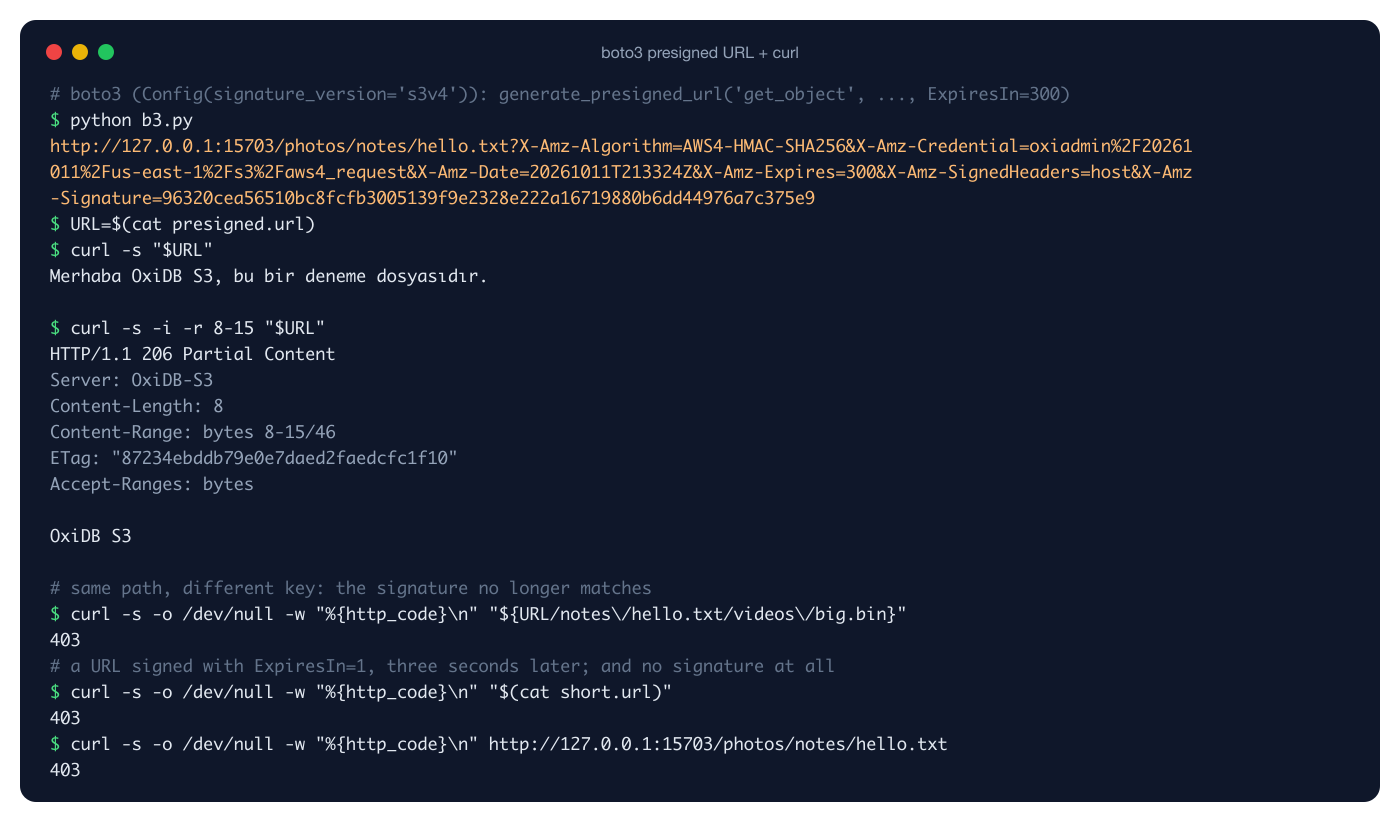
Every line in the image is real output: a full read with the signed URL and a 206 Partial Content with -r 8-15; the same signature on a different key gives 403; a URL signed with ExpiresIn=1 and used three seconds later gives 403; an unsigned request gives 403.
One trap: in us-east-1, boto3's generate_presigned_url can still produce the legacy SigV2 format (AWSAccessKeyId=...&Signature=...&Expires=...). That is exactly what happened on my first try. OxiDB only accepts SigV4, so give the client Config(signature_version="s3v4").
A word about credentials
OXIDB_S3_CREDENTIALS lets you define several keys, but they are identities, not permissions. There are no bucket policies, no ACLs, no read-only keys; every valid key can do everything. I confirmed it by deleting an object with the key literally named reader:
$ AWS_ACCESS_KEY_ID=reader AWS_SECRET_ACCESS_KEY=readersecret456 aws --endpoint-url $EP s3 rm s3://photos/archive/hello-copy.txt
delete: s3://photos/archive/hello-copy.txt
The benefit of multiple keys is giving each application its own and rotating them independently. If you need permission separation, for now you solve it in a reverse proxy or with presigned URLs. The RBAC on the native wire protocol does not extend to the S3 layer yet.
Inside: how objects are stored
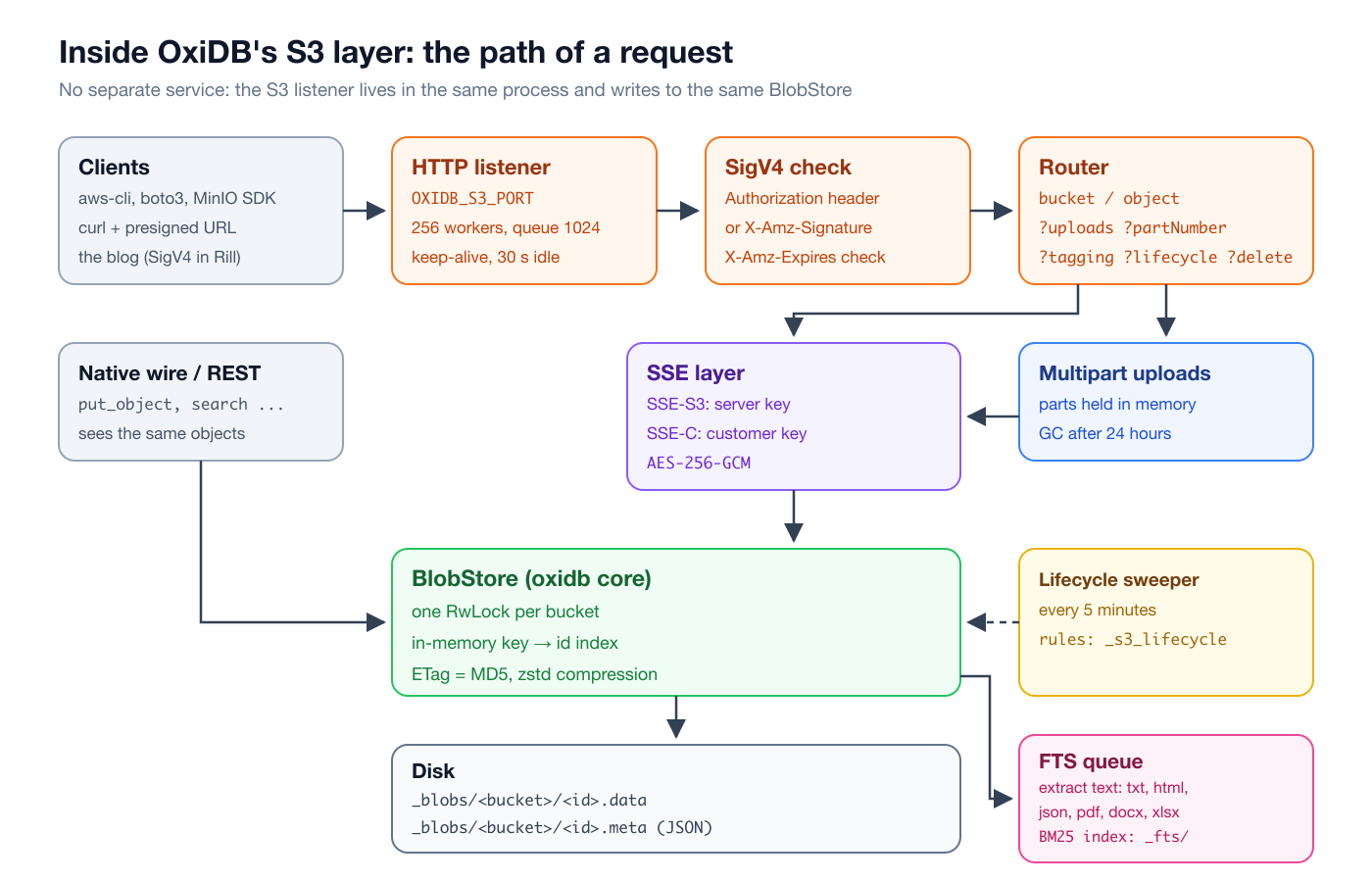
The S3 layer is about 2,800 lines of Rust under oxidb-server/src/s3/: auth (SigV4), bucket, object, multipart, tagging, lifecycle, encryption, batch and small helpers. HTTP parsing lives in a separate oxidb-http crate, because the control plane (oxibase) uses the same parser without linking the engine (ADR-0021). The listener runs a fixed pool of 256 worker threads with a bounded queue of 1024; when the queue is full, new connections are rejected instead of letting memory grow without bound. Connections are keep-alive and close after 30 seconds idle. Each worker runs inside catch_unwind, so a single bad request cannot take the server down.
The real work happens in the core BlobStore (src/blob.rs). The disk layout is deliberately plain:
data/oxidb/_blobs/
  photos/
    0.data   0.meta
    1.data   1.meta
  secure/
    0.data   0.meta
Every object is two sibling files: <id>.data holds the raw (or compressed/encrypted) payload, and <id>.meta is a JSON document describing the object. <id> is an internal number; the user's key (notes/hello.txt) lives inside the meta file. That way slashes, spaces or Turkish characters in keys never concern the file system. On startup the server scans each bucket directory and builds in-memory key → id and id → meta maps; HEAD and LIST are answered from those maps without touching the disk. The format is documented in docs/format/blob-object.md and is part of the 1.0 stability scope (ADR-0003). The meta file carries a format_version, and a reader refuses a version newer than it knows: a tripwire that keeps an older engine from silently corrupting data written by a newer one.
With compression on, text objects shrink noticeably. I uploaded a 219,732-byte access log:
{"key":"raw/access.log","bucket":"logs","size":219732,"content_type":"text/plain",
 "etag":"a4094dc3a7fe303056d409f26b951a05","created_at":"2026-10-11T21:34:34Z","metadata":{},
 "storage_compression":"zstd","stored_size":8344,"format_version":1}
It takes 8,344 bytes on disk. size is always the plaintext size, stored_size the space used on disk. The compressor skips files under 256 bytes, content that saves less than 5%, and types that are already compressed (image/, video/, audio/*, PDF, ZIP-based Office documents, gzip...): recompressing a JPEG costs CPU on every PUT and GET and buys almost nothing. That is why this blog's images are stored as-is.
The journey of a PUT
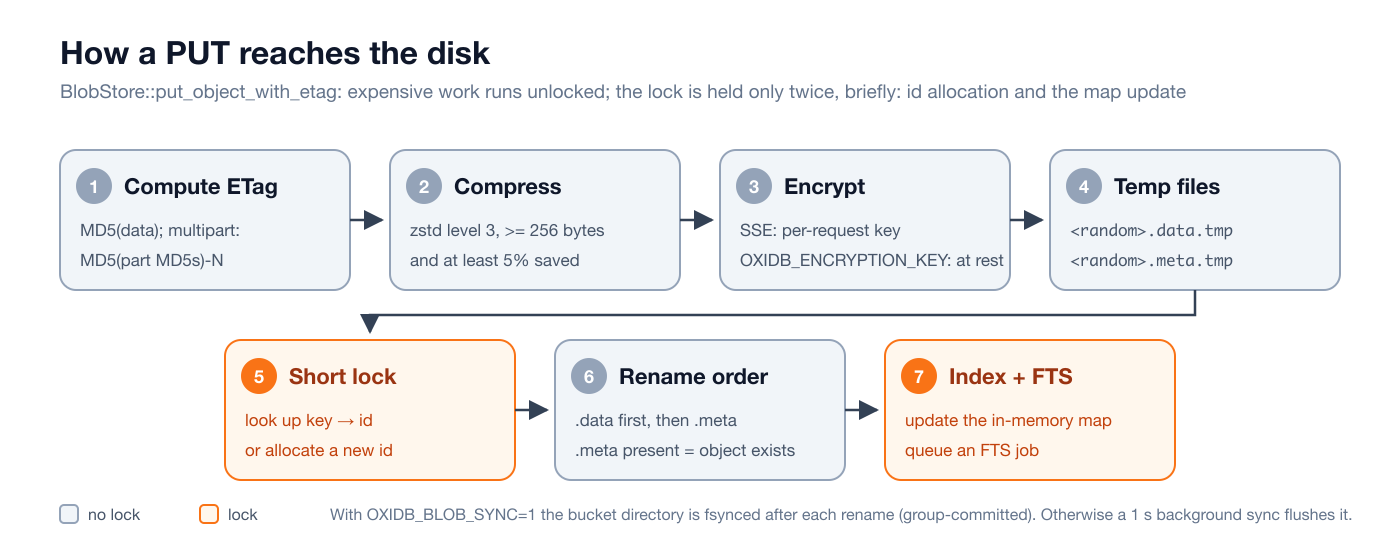
The design of put_object_with_etag came out of a concurrency problem. In the first version the bucket's write lock was held while the files were renamed. In a load test with 32 concurrent writers the p50 latency climbed to around 900 ms (the figure recorded in the CHANGELOG). Now the expensive work (MD5, zstd, encryption, writing temp files) runs under no lock at all. The lock is taken for two brief moments only: to find or allocate an id for the key, and at the end to update the in-memory map. Different buckets never contend, because the outer RwLock guards only the bucket map and each bucket has its own RwLock for its state.
The crash-safety rule is simple: if the .meta exists, the object exists. So .data is renamed into place first, .meta second. On startup a .data without a .meta is treated as an orphan and swept; a .meta without a .data would be a ghost read, and the ordering prevents it. Torn or undecryptable .meta files are not deleted, they are quarantined.
There are two durability modes. By default rename is only metadata-atomic, and the bytes reach disk through a once-per-second background sync or the kernel's normal writeback; a power cut can lose the last second of writes. With OXIDB_BLOB_SYNC=1 the temp files are fsynced before each PUT returns, and the bucket directory is fsynced between the two renames and after them. Directory fsyncs are group-committed: a dedicated thread owns the fsync, and 100 concurrent PUTs share a single directory fsync. I added this mode for callers that treat a successful write as a commit, like an SMTP server that must not lose a mail it already answered "250 OK" for. A Go test harness (tests/blob-crash-recovery-go/) kills the process mid-write to check crash consistency.
There is no document-engine WAL in this path. Object writes do not take part in document transactions; "save the order and upload the invoice" is not atomic. In practice you upload the object first and then write the document (or the reverse, cleaning up on failure). Point-in-time restore also brings blobs back only to the base-backup point.
Same object, two doors
S3 is only one door. The same BlobStore is reachable from the native wire protocol. I read the file uploaded through S3 with OxiDB's Python client:
from oxidb import OxiDbClient
db = OxiDbClient("127.0.0.1", 15700)
print(db.list_buckets())
print(json.dumps(db.head_object("photos", "notes/hello.txt"), ensure_ascii=False))
data, meta = db.get_object("photos", "notes/hello.txt")
print(data.decode())
['documents', 'logs', 'many', 'photos', 'secure']
{"key": "notes/hello.txt", "bucket": "photos", "size": 46, "content_type": "text/plain", "etag": "87234ebddb79e0e7daed2faedcfc1f10", "created_at": "2026-10-11T21:32:36Z", "metadata": {"tag-project": "blog", "tag-lang": "tr"}, "stored_size": 46, "format_version": 1}
Merhaba OxiDB S3, bu bir deneme dosyasıdır.On the native protocol content travels as base64 (put_object, get_object, head_object, list_objects, delete_object, create_bucket ...). For large files the S3 door is more efficient, but being able to write small files over the same connection as your document operations is handy.
Searching inside files
To me this is the most valuable part of the layer. Every PUT drops a job on an FTS queue after the object is written. Background workers look at the object's Content-Type, extract the text and add it to an inverted index ranked with BM25; a DELETE removes it from the index. Supported formats: plain text and CSV, HTML and XML (tags stripped), JSON (all string values, recursively), PDF, DOCX (word/document.xml), XLSX (xl/sharedStrings.xml), and with the ocr feature, PNG/JPEG/TIFF/BMP through Tesseract.
I uploaded four files with aws-cli: a text report, an HTML release note, a JSON asset record and a real DOCX produced with macOS's textutil:
aws --endpoint-url $EP s3 mb s3://documents
aws --endpoint-url $EP s3 cp docs/ s3://documents/ --recursive --only-show-errors
aws --endpoint-url $EP s3api list-objects-v2 --bucket documents --query "Contents[].[Key,Size]" --output text
aws --endpoint-url $EP s3api head-object --bucket documents --key minutes.docx --query ContentType --output text
asset.json 107
minutes.docx 3540
page.html 189
rapor.txt 174
application/vnd.openxmlformats-officedocument.wordprocessingml.documentaws-cli guesses the Content-Type from the file extension and OxiDB picks the extractor accordingly. Then a search over the wire protocol:
for q in ("conveyor", "presigned", "november"):
    print(f"search {q!r}:")
    for hit in db.search(q, bucket="documents", limit=5):
        print("  ", json.dumps(hit))
search 'conveyor':
{"bucket": "documents", "key": "asset.json", "score": 0.7813213802071468}
{"bucket": "documents", "key": "minutes.docx", "score": 0.7132708083826534}
{"bucket": "documents", "key": "rapor.txt", "score": 0.4968852822440956}
search 'presigned':
{"bucket": "documents", "key": "page.html", "score": 1.3500054067641225}
search 'november':
{"bucket": "documents", "key": "asset.json", "score": 1.7364027140004965}With "highlight": true every hit also returns <mark>-tagged snippets. The server re-reads the matching file and extracts its text again to build them, so this only happens when you ask:
{"cmd": "search", "query": "conveyor", "bucket": "documents", "limit": 3, "highlight": true}{"ok": true, "data": [
{"bucket": "documents", "key": "asset.json", "score": 0.7813213802071468, "highlights": ["<mark>conveyor</mark> belt installed in warehouse B inspectio"]},
{"bucket": "documents", "key": "minutes.docx", "score": 0.7132708083826534, "highlights": ["Meeting minutes: the board approved the <mark>conveyor</mark> upgrade budget for the Istanbul warehou"]},
{"bucket": "documents", "key": "rapor.txt", "score": 0.4968852822440956, "highlights": ["nventory turnover improved, and the new <mark>conveyor</mark>\nsystem reduced picking time. Next quart"]}
]}So you upload a Word document with a stock S3 client and find it by a word inside it, with no Elasticsearch, Lambda trigger or ETL pipeline in between. I cover the index structure, the BM25 parameters (OXIDB_FTS_K, OXIDB_FTS_B), language support and how it combines with vector search in the full-text and vector search post. Indexing is asynchronous, so a search issued right after a PUT returns may miss the new file by a few milliseconds.
How this blog uses OxiDB S3
When I upload an image from the blog's admin panel, the server generates a UUID, PUTs the file into the blog-media bucket under img/<uuid>.<ext>, and pages serve the image through that key. The blog is written in Rill, my own language, and so is its S3 client: src/s3.rill is a 140-line file containing a SigV4 implementation with SHA-256, the HMAC chain and the canonical request. So OxiDB's SigV4 verifier is exercised every day not only by boto3 but by a third, from-scratch implementation. The same OxiDB process keeps the blog's posts in the SQL engine, its search index in the document engine, its sessions, counters and page cache in OxiMem, and its images in S3: one data directory, one backup.
Limits and an honest assessment
This layer is not a MinIO or Ceph competitor. It answers the need "my application's files should sit next to my database and standard tools should see them". What you should know:
| Topic | Status |
|---|---|
| Addressing | Path-style only (/bucket/key). No virtual-hosted style (bucket.host). |
| Memory | PUT bodies, multipart parts and GET responses are fully buffered. HTTP body limit is 5 GiB. |
| Range | The whole object is read and then sliced. |
| Multipart | Parts are in memory; half-finished uploads are lost on restart. |
| Permissions | No difference between keys; no policies, no ACLs. |
| Versioning | No object versioning, object lock or replication. |
| Lifecycle | Expiration/Days only, one rule per bucket. |
| SSE | Size/ETag reflect ciphertext; a wrong SSE-C key gives 500. |
| Listing | Continuation bug past 2000 objects (above); ListBuckets returns a fixed creation date. |
| Conditions | If-Modified-Since is string equality, not a date comparison. |
| Transactions | Object writes do not join document transactions. |
What you get in return: no separate service, aws-cli/boto3/MinIO SDKs working unmodified, ETags that match S3 exactly (where many "S3-compatible" servers trip up), real SigV4 and presigned URLs, every uploaded document automatically searchable, and objects backed up in the same data directory as your documents, SQL tables and time series.
Try it
You can download OxiDB as a prebuilt binary for macOS and Linux (arm64 and x86_64) from the GitHub releases page, or build an image with the Dockerfile at the repository root. To turn on the S3 layer, OXIDB_S3_PORT and one key pair are enough; then hand --endpoint-url to whatever S3 client you already use. The next post is about OxiDB's MQTT and AMQP messaging layer, where you will see the same idea again: standard clients connect unmodified, and the data stays in the same process.