OxiMem in OxiDB: an in-memory key-value store that speaks the Redis protocol
I built a RESP-speaking key-value layer into OxiDB: five data types, TTLs, pub/sub, WATCH, Lua and snapshots. Real redis-cli and redis-py sessions, benchmarks against Redis 8.6, and the honest limits.
An application's data is not all one kind. Orders, user records and posts must not be lost, so they go to the document engine or the SQL engine: into the WAL, wait for fsync, back after a crash. But every application also has a hot edge: session tokens, page view counters, rate-limit windows, short-lived job queues, cached HTML. These change hundreds of times a second, and if they vanish nobody gets hurt. Running them through the durability machinery is waste. Normally this is where you put a Redis next to your database. In OxiDB I did something else: I built an in-memory key-value layer called OxiMem into the same process and made it speak RESP, the Redis wire protocol. The result is that stock clients such as redis-cli, redis-py, go-redis and node-redis connect to OxiDB directly.
This post covers OxiMem end to end: how to turn it on, which data types and commands it supports, expiry, pub/sub, MULTI/EXEC/WATCH, Lua scripts, the persistence options, how it works inside, the throughput and memory I measured against Redis, and, just as important, where it differs from Redis. Every output below comes from an OxiDB 0.44.2 server I ran on my own machine (Apple M4, macOS 26.3).
One more thing: the blog you are reading uses OxiMem too. It lives at www.baltavista.com, its server is written in Rill (my own language), and its data is in OxiDB: posts and tags on the SQL and document side, images in the S3 layer, and the live view count at the bottom of this page is an INCR in OxiMem. I will come back to that at the end.
Why RESP?
The easy part of writing an in-memory store is the store. The hard part is connecting it to the world: client libraries, connection pools, command-line tools, framework integrations. A protocol of my own would have meant rebuilding all of that. Speaking RESP gets the whole ecosystem for free.
RESP itself is pleasantly small. The first byte of each message gives its type: + simple string, - error, : integer, $ length-prefixed bulk string, * array. A client command is always an array of bulk strings. On the wire, GET session:42 looks like this:
*2\r\n$3\r\nGET\r\n$10\r\nsession:42\r\nLength prefixes solve framing, but they also open an attack surface: the client picks the length. So OxiMem's parser rejects any bulk string or array header above 16 MiB before allocating a byte (MAX_RESP_BULK_LEN in resp.rs).
Turning it on: one environment variable
OxiMem is off by default. Giving it a port is enough:
OXIDB_ADDR=127.0.0.1:15600 \
OXIDB_DATA=./data \
OXIDB_OXIMEM_PORT=15602 \
./oxidb-server
On startup the server prints:
oxidb-server listening on 127.0.0.1:15600 (pool_size=4, data_dir=./data, idle_timeout=0s)
OxiMem RESP listening on 0.0.0.0:15602 (fast mode)
Two things to notice. First, the address is 0.0.0.0: the OxiMem listener binds every interface regardless of OXIDB_ADDR. The security section below explains why that matters. Second, fast mode: by default OxiMem is purely in memory. The other options (snapshots and the document mirror) are in the persistence section. If you pass auto instead of a port, the kernel picks a free one and an oximem=<port> line lands in the OXIDB_READY_FILE; that is how my tests start servers.
OxiMem counts as a document-backed listener, so a server started with OXIDB_DOC=0 (document engine off) refuses to start if OXIDB_OXIMEM_PORT is set, and says why.
Nothing needs to be installed to connect; plain redis-cli works:
$ redis-cli -p 15602 PING
PONG
Data types
OxiMem supports Redis's five core types: strings, hashes, lists, sets and sorted sets. On top of those come the GEO commands (built on sorted sets, as in Redis) and bit operations on strings.
Strings and counters
The simplest case: a key and a value.
127.0.0.1:15602> SET user:42:name "Ayse"
OK
127.0.0.1:15602> GET user:42:name
"Ayse"
127.0.0.1:15602> APPEND user:42:name " Y."
(integer) 7
127.0.0.1:15602> SETNX user:42:name "Other"
(integer) 0
127.0.0.1:15602> GETRANGE user:42:name 0 3
"Ayse"
127.0.0.1:15602> MSET a 1 b 2 c 3
OK
127.0.0.1:15602> MGET a b c missing
1) "1"
2) "2"
3) "3"
4) (nil)
127.0.0.1:15602> GETDEL user:42:name
"Ayse Y."
127.0.0.1:15602> GET user:42:name
(nil)
Counters are the most useful face of a key-value store, because they do read-modify-write in one atomic command. Two concurrent requests cannot swallow each other's increment:
127.0.0.1:15602> INCR page:views
(integer) 1
127.0.0.1:15602> INCRBY page:views 10
(integer) 11
127.0.0.1:15602> DECR page:views
(integer) 10
127.0.0.1:15602> INCRBYFLOAT price 2.5
"2.5"
127.0.0.1:15602> SET counter abc
OK
127.0.0.1:15602> INCR counter
(error) ERR value is not an integer or out of range
127.0.0.1:15602> SETBIT flags 7 1
(integer) 0
127.0.0.1:15602> BITCOUNT flags
(integer) 1
Values are bytes and STRLEN counts bytes, as in Redis. Writing "Ayşe" from redis-py gave a STRLEN of 5, because "ş" is two bytes in UTF-8.
Hashes
Fields of one object under one key, with atomic per-field increments:
127.0.0.1:15602> HSET user:42 name Ayse city Izmir visits 0
(integer) 3
127.0.0.1:15602> HINCRBY user:42 visits 1
(integer) 1
127.0.0.1:15602> HGETALL user:42
1) "city"
2) "Izmir"
3) "visits"
4) "1"
5) "name"
6) "Ayse"
127.0.0.1:15602> HEXISTS user:42 email
(integer) 0
127.0.0.1:15602> TYPE user:42
hash
Field order is not insertion order: a hash is a HashMap inside, and order is not guaranteed (it is not in Redis either).
Lists
Backed by a VecDeque, so pushes and pops at both ends are O(1). Push right, pop left, and you have a FIFO queue:
127.0.0.1:15602> RPUSH jobs job-1 job-2 job-3
(integer) 3
127.0.0.1:15602> LPUSH jobs job-0
(integer) 4
127.0.0.1:15602> LRANGE jobs 0 -1
1) "job-0"
2) "job-1"
3) "job-2"
4) "job-3"
127.0.0.1:15602> LPOP jobs
"job-0"
127.0.0.1:15602> LMOVE jobs done LEFT RIGHT
"job-1"
127.0.0.1:15602> LRANGE done 0 -1
1) "job-1"
The blocking variants exist too: BLPOP, BRPOP, BZPOPMIN, BLMOVE, BRPOPLPUSH. With one client waiting in BLPOP queue 5 on an empty list and another client doing RPUSH queue job-42 a second later, I measured:
1) "queue"
2) "job-42"
waited 0.98s
On a list that stays empty it returns (nil) when the timeout runs out (a 1-second wait took 1.02 s). Waiters sleep on a Condvar; every list or sorted-set write such as LPUSH, RPUSH or ZADD signals it.
Sets
Membership, intersection, union:
127.0.0.1:15602> SADD online 42 77 91
(integer) 3
127.0.0.1:15602> SISMEMBER online 77
(integer) 1
127.0.0.1:15602> SMISMEMBER online 42 13
1) (integer) 1
2) (integer) 0
127.0.0.1:15602> SADD admins 42 5
(integer) 2
127.0.0.1:15602> SINTER online admins
1) "42"
127.0.0.1:15602> SUNION online admins
1) "42"
2) "5"
3) "77"
4) "91"
Sorted sets
Leaderboards, priority queues, order books. There are two structures inside: a HashMap from member to score (O(1) ZSCORE) and a BTreeSet of (score, member) pairs (ordered range queries). Scores are f64, ordered with total_cmp, so not even a NaN can corrupt the tree.
127.0.0.1:15602> ZADD scores 1500 ayse 1800 mehmet 1200 zeynep
(integer) 3
127.0.0.1:15602> ZINCRBY scores 400 zeynep
"1600"
127.0.0.1:15602> ZREVRANGE scores 0 2 WITHSCORES
1) "mehmet"
2) "1800"
3) "zeynep"
4) "1600"
5) "ayse"
6) "1500"
127.0.0.1:15602> ZRANGEBYSCORE scores 1550 +inf
1) "zeynep"
2) "mehmet"
127.0.0.1:15602> ZPOPMAX scores
1) "mehmet"
2) "1800"
The GEO commands are layered on sorted sets, just as in Redis, and TYPE reports zset:
127.0.0.1:15602> GEOADD cities 27.1428 38.4237 izmir 28.9784 41.0082 istanbul 32.8597 39.9334 ankara
(integer) 3
127.0.0.1:15602> GEODIST cities izmir istanbul km
"327.4546"
127.0.0.1:15602> GEOSEARCH cities FROMMEMBER izmir BYRADIUS 400 km ASC
1) "izmir"
2) "istanbul"
127.0.0.1:15602> TYPE cities
zset
For serious spatial work (polygons, indexes) see the post on OxiDB's geospatial and graph queries; the GEO commands here are for Redis compatibility.
Expiry
The most characteristic thing about a key-value layer is that data can die on its own. You don't write a cleanup job for session tokens; you give them a lifetime:
127.0.0.1:15602> SETEX session:abc 900 "user=42"
OK
127.0.0.1:15602> TTL session:abc
(integer) 900
127.0.0.1:15602> SET session:xyz "user=7" PX 1500
OK
127.0.0.1:15602> PTTL session:xyz
(integer) 1995
127.0.0.1:15602> EXPIRE user:42 2
(integer) 1
127.0.0.1:15602> PERSIST session:abc
(integer) 1
127.0.0.1:15602> TTL session:abc
(integer) -1
127.0.0.1:15602> TTL no:such:key
(integer) -2
Two and a half seconds later:
127.0.0.1:15602> GET session:xyz
(nil)
127.0.0.1:15602> EXISTS user:42
(integer) 0
Two details here. First, user:42 is a hash, and it expired as well. In earlier versions the deadline was a field of the string entry, so TTL silently worked on strings only. I fixed that in 0.43.2: deadlines now live in a separate expires map keyed by name, and apply to all five types the same way. Redis makes the same split (a separate expires dict beside the keyspace).
Second, PTTL session:xyz returned 1995, not 1500. SET ... PX rounds milliseconds up to whole seconds (ms.div_ceil(1000)), so 1.5 s becomes 2 s. PEXPIRE is millisecond-precise in the code. If you rely on millisecond-accurate lifetimes, you need to know this.
The mechanism has two layers:
- Lazy expiry: before a command runs, the keys it is about to touch are checked, and an expired one is deleted on the spot. You never see an expired value. When nothing in the store has a deadline, this check costs a single uncontended read lock.
- Sweeper thread: so that keys nobody reads don't stay in memory forever, a thread wakes up every second and deletes expired keys in bulk. For each one it bumps the WATCH version counter and, if enabled, publishes an
expirednotification.
Keyspace notifications
Enabled with CONFIG SET notify-keyspace-events. When on, every write publishes to __keyspace@0__:<key> and __keyevent@0__:<event> over the existing pub/sub. With a client listening on PSUBSCRIBE '__key*__:*', I ran SET k1 v EX 1 and INCR views:demo; a second later the sweeper removed k1:
1) "pmessage"
2) "__key*__:*"
3) "__keyspace@0__:k1"
4) "set"
...
1) "pmessage"
2) "__key*__:*"
3) "__keyspace@0__:views:demo"
4) "incr"
...
1) "pmessage"
2) "__key*__:*"
3) "__keyevent@0__:expired"
4) "k1"
One difference from Redis: OxiMem does not distinguish event classes (K, E, g, x...). Any non-empty value turns notifications fully on, an empty value turns them off.
Pub/Sub
SUBSCRIBE, PSUBSCRIBE (glob patterns) and PUBLISH are supported. With one subscriber on SUBSCRIBE news and another on PSUBSCRIBE 'price.*':
127.0.0.1:15602> PUBLISH price.BTC 68500
(integer) 1
127.0.0.1:15602> PUBLISH news "hello"
(integer) 1
127.0.0.1:15602> PUBLISH nobody x
(integer) 0
What the pattern subscriber saw:
1) "pmessage"
2) "price.*"
3) "price.BTC"
4) "68500"
The number PUBLISH returns is how many subscribers received the message; 0 if nobody is listening. This is fire-and-forget: a subscriber that is not connected at that moment misses it. For durable queues OxiDB has its MQTT and AMQP layer.
A nice side effect: OxiDB's MQTT broker rides on the same OxiMemStore pub/sub. So a Redis client can receive a message published over MQTT. With redis-cli SUBSCRIBE sensors/temp open, I ran mosquitto_pub -p 15603 -t sensors/temp -m 21.5:
1) "subscribe"
2) "sensors/temp"
3) (integer) 1
1) "message"
2) "sensors/temp"
3) "21.5"
An IoT device publishes readings over MQTT, a web server listens with redis-py, and there is no bridge software in between.
MULTI, EXEC and WATCH
MULTI opens a queue; the following commands don't run but pile up with QUEUED. On EXEC they all run back to back, with no other transaction in between:
127.0.0.1:15602> MULTI
OK
127.0.0.1:15602> SET counter 5
QUEUED
127.0.0.1:15602> INCRBY counter 10
QUEUED
127.0.0.1:15602> EXEC
1) OK
2) (integer) 15
Redis gets this isolation for free by being single-threaded. OxiMem is multi-threaded, so it buys isolation explicitly: EXEC takes the store's tx_lock and holds it only while draining its own queue. Two EXEC blocks can never interleave.
Commands are also validated at queue time. An unknown command or a missing argument poisons the transaction, and EXEC refuses without running anything:
127.0.0.1:15602> MULTI
OK
127.0.0.1:15602> SET z 1
QUEUED
127.0.0.1:15602> NOPE z
(error) ERR unknown command 'NOPE'
127.0.0.1:15602> GET z
QUEUED
127.0.0.1:15602> EXEC
(error) ERR EXECABORT Transaction discarded because of previous errors.
127.0.0.1:15602> GET z
(nil)
SET z 1 never ran. A transaction with a typo doesn't touch the data.
WATCH: optimistic locking
MULTI/EXEC gives atomicity, but not "is the value I read still valid?". Logic like "read the balance, debit if it is enough" is open to a lost update when someone writes between the read and the write. That is what WATCH is for: if a watched key changed before EXEC, the transaction doesn't run and EXEC returns a null array. With two clients:
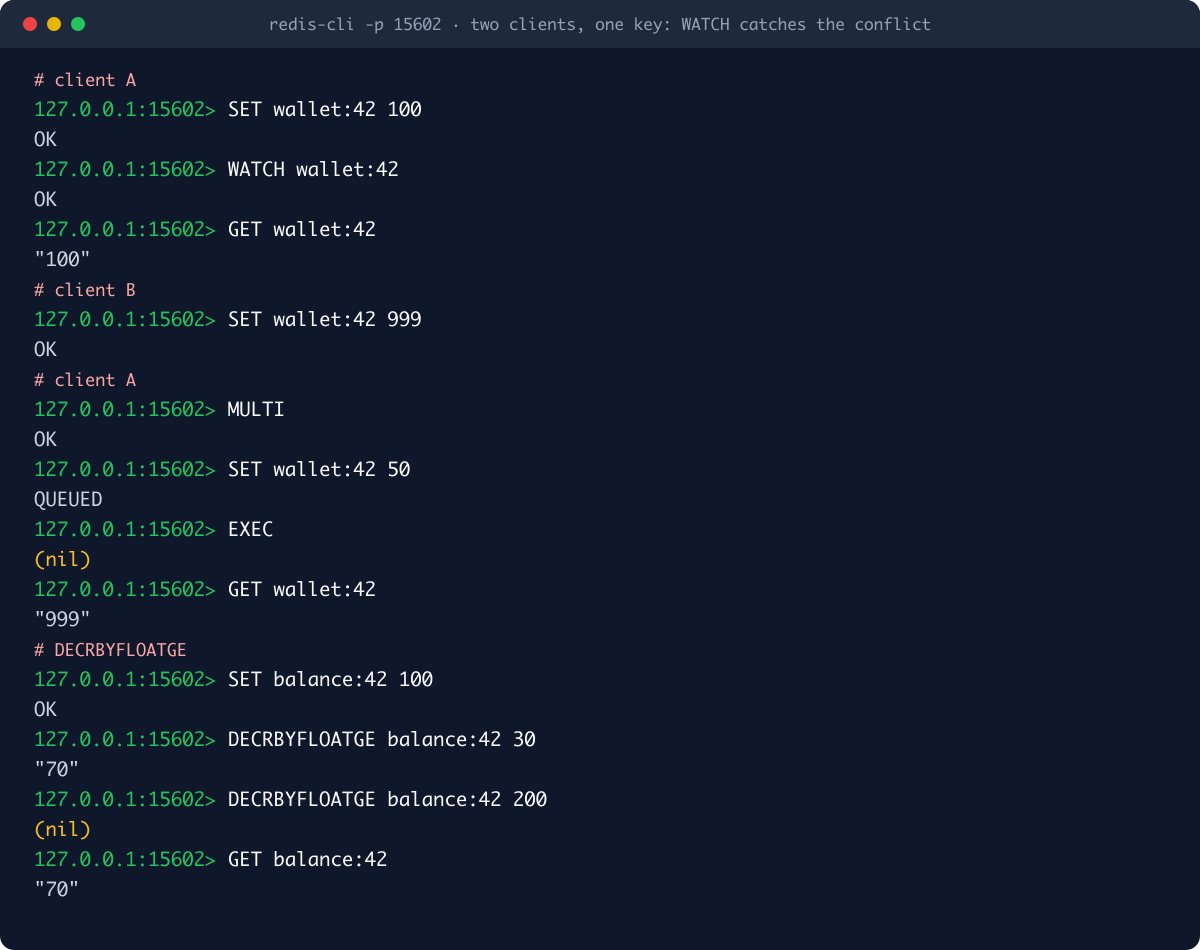
A watched wallet:42 and read 100. B stepped in and wrote 999. A's EXEC returned (nil), and A's write never happened.
How the change is detected is my favourite part of the design. No copy of the value is taken; if watching a big sorted set meant copying it, the O(n) cost would kill everything. Instead every key has a mutation counter, and a WATCH snapshot is three small numbers:
/// O(1) fingerprint of a key for WATCH change detection: the store epoch
/// (bumped by FLUSHALL), the key's mutation counter (bumped by every write
/// command touching it), and whether the key currently exists (so a lazy
/// TTL expiry between WATCH and EXEC still registers as a change).
type KeySnap = (u64, u64, bool);
Every successful write bumps the counters of the keys it touched. FLUSHALL bumps a store-wide epoch, which invalidates every WATCH at once. The "exists" flag catches a key that silently expired between the two reads. EXEC recomputes these triples under tx_lock and compares.
There is a deliberate asymmetry: the counter is bumped even when a write changes nothing (rewriting the same value, say). So false alarms are possible and cost a needless retry. A missed change is not possible. A false alarm costs one round trip; a miss costs corrupted data.
So the counter map can't grow forever, it is garbage-collected: once it passes 100,000 entries and no session holds a WATCH at that moment, it is cleared (the threshold is OXIMEM_VERSIONS_GC). If nobody is watching, losing the counters breaks nothing; the next WATCH starts fresh.
WATCH under contention with redis-py
I also tried it under load. Two accounts, acct:a = 1000 and acct:b = 0. Eight threads, each doing 250 "move 1 from a to b" operations with WATCH + MULTI, retrying on WatchError. That is 2000 attempts, but a only holds 1000 units, so exactly 1000 should succeed:
def transfer(n):
    c = redis.Redis(host="127.0.0.1", port=15602, decode_responses=True, protocol=2)
    for _ in range(n):
        with c.pipeline() as p:
            while True:
                try:
                    p.watch("acct:a", "acct:b")
                    a = int(p.get("acct:a"))
                    if a < 1:
                        p.unwatch()
                        break
                    p.multi()
                    p.decrby("acct:a", 1)
                    p.incrby("acct:b", 1)
                    p.execute()
                    break
                except WatchError:
                    retries += 1   # (counter guarded by a lock)
Result:
after 2000 transfers: a=0 b=1000 sum=1000 watch_retries=3695The sum is preserved, nothing went negative, no update was lost. The 3695 retries show how hard eight threads fight over the same two keys; that is exactly the price of optimistic locking.
Lua scripts: EVAL, EVALSHA, SCRIPT
Under heavy contention the WATCH loop spins. The alternative is to run the whole read-decide-write logic on the server in one step. I embedded Lua 5.4 through mlua; scripts call commands with redis.call and redis.pcall, and cjson is available.
127.0.0.1:15602> SET wallet:7 100
OK
127.0.0.1:15602> EVAL "local b = tonumber(redis.call('GET', KEYS[1]) or '0') if b >= tonumber(ARGV[1]) then return redis.call('DECRBY', KEYS[1], ARGV[1]) end return -1" 1 wallet:7 30
(integer) 70
127.0.0.1:15602> EVAL "...same script..." 1 wallet:7 500
(integer) -1
127.0.0.1:15602> SCRIPT LOAD "...same script..."
"777ac28203607bd0918ff085cb356478607980cb"
127.0.0.1:15602> EVALSHA 777ac28203607bd0918ff085cb356478607980cb 1 wallet:7 20
(integer) 50
127.0.0.1:15602> EVAL "return cjson.encode({n=redis.call('INCR', KEYS[1])})" 1 hits
"{\"n\":1}"
The concurrency model differs from Redis, because scripts here can run in parallel:
- Each script takes the read side of an
eval_gatelock (many scripts at once);EXECtakes the write side and excludes all scripts. - A script locks the stripes, out of 128, that its declared keys (
KEYS) hash to, in sorted order. Sorted acquisition means no deadlocks, and scripts on disjoint keys run fully in parallel. - Touching an undeclared key from inside a script is atomic per command, not per script. Redis also asks scripts to declare all keys in
KEYS; here that rule directly decides the locking. - The Lua VM is created once per connection thread and reused (
thread_local). Creating a fresh VM and re-parsing the script on everyEVALwas eating most of the settlement latency I measured. - A hook runs every 20,000 Lua instructions: a script that passes 200 ms, or gets a
SCRIPT KILL, is stopped.
I tried an infinite loop: EVAL "while true do end" 0 stopped after about 200 ms and the server stayed healthy. But I found a rough edge there: the error message includes Lua's multi-line stack traceback, and RESP simple error lines cannot contain newlines. redis-cli could not parse the reply and printed Error: Bad simple string value. The connection survives, but it is a bug and it is on my list.
DECRBYFLOATGE: the one command Redis doesn't have
"Debit if the balance is enough" is so common that I added a native command that doesn't even need Lua. DECRBYFLOATGE key amount: if the value is greater than or equal to the amount, it is decremented atomically and the new value returned; otherwise nothing is touched and nil comes back. The bottom half of the terminal image above shows it: 30 debited from 100, a 200 debit refused, the balance stays at 70. A debit that breaks a credit limit is impossible even under a race. It is OxiMem-specific; from standard Redis clients you call it as a raw command, e.g. execute_command("DECRBYFLOATGE", ...).
Unmodified clients: redis-cli and redis-py
Every terminal output in this post was taken with the stock redis-cli 8.6.1 from Homebrew. For Python I installed redis-py 8.1.0 with pip install redis into a separate venv and ran this script (shortened):
import redis

r = redis.Redis(host="127.0.0.1", port=15602, decode_responses=True, protocol=2)

r.set("user:42:name", "Ayşe")
print("get:", r.get("user:42:name"), "strlen:", r.strlen("user:42:name"))
r.hset("user:42", mapping={"name": "Ayşe", "city": "İzmir"})
print("hgetall:", r.hgetall("user:42"))

pipe = r.pipeline(transaction=False)
for _ in range(1000):
    pipe.incr("views:hello")
print("pipeline last:", pipe.execute()[-1])

debit = r.register_script("""
local b = tonumber(redis.call('GET', KEYS[1]) or '0')
if b >= tonumber(ARGV[1]) then return redis.call('DECRBY', KEYS[1], ARGV[1]) end
return -1
""")
r.set("wallet:7", 100)
r.script_load(debit.script)
print("lua debit 30:", debit(keys=["wallet:7"], args=[30]),
      " debit 500:", debit(keys=["wallet:7"], args=[500]))

ps = r.pubsub()
ps.subscribe("news")
ps.get_message(timeout=1)
r.publish("news", "OxiMem says hi")
msg = ps.get_message(timeout=2)
print("pubsub:", msg["channel"], msg["data"])
Output:
get: Ayşe strlen: 5
hgetall: {'name': 'Ayşe', 'city': 'İzmir'}
pipeline last: 1000
after 2000 transfers: a=0 b=1000 sum=1000 watch_retries=3695
lua debit 30: 70  debit 500: -1
pubsub: news OxiMem says hi
I have to be honest about two things, because I ran into both while writing this:
protocol=2is required. redis-py 8 sendsHELLO 3on connect by default, asking for RESP3. OxiMem only speaks RESP2 and answers with an error, and redis-py fails instead of falling back:redis.exceptions.ResponseError: NOPROTO unsupported protocol version. One argument (protocol=2) fixes it, but "no changes needed" would not be true.register_scriptneeds ascript_loadfirst. redis-py triesEVALSHAand, onNoScriptError, loads the script and retries. OxiMem's error helper prefixes every message withERR, so the reply is-ERR NOSCRIPT ...and redis-py doesn't recognise it asNoScriptError. The same prefix shows up inERR EXECABORTandERR NOPROTO. The fix is small (no prefix for those codes) and on my list.
Persistence: three modes
"In memory" means "can be lost", and for most uses that is the right call. But there is a middle ground that says "surviving a restart is enough".
1. Fast mode (default)
Nothing goes to disk. When the process exits, the keyspace is gone. Ideal for caches and sessions.
2. Snapshots: OXIDB_OXIMEM_SNAPSHOT_SECS
With this variable set, OxiMem reads <OXIDB_DATA>/_oximem.snap at boot and then writes the whole store to it every N seconds. The write goes to a temp file, is fsynced, then renamed into place, so a crash mid-write can never corrupt the previous snapshot. The file is plain JSON:
{"s":[{"k":"session:s1","v":"x"},{"k":"views:hello","v":"42"}],"h":[{"k":"user:1","m":{"name":"Ayse"}}],"l":[{"k":"q","v":["a","b","c"]}],"t":[],"z":[{"k":"board","z":[["a",10.0],["b",20.0]]}],"x":[["session:s1",1791754990]]}The x section holds absolute deadlines of expiring keys, so the remaining TTL is right after a restart. I ran the server with OXIDB_OXIMEM_SNAPSHOT_SECS=2, wrote a few keys, stopped it and started it again:
OxiMem RESP listening on 0.0.0.0:15602 (fast mode)
OxiMem snapshot loaded
127.0.0.1:15602> GET views:hello
"42"
127.0.0.1:15602> TTL session:s1
(integer) 593
127.0.0.1:15602> LRANGE q 0 -1
1) "a"
2) "b"
3) "c"
Now the limit. After a snapshot I ran INCR views:hello (it returned 43) and stopped the server before two seconds had passed:
127.0.0.1:15602> INCR views:hello
(integer) 43
# server stopped and restarted
127.0.0.1:15602> GET views:hello
"42"
The window since the last snapshot is lost. No final snapshot is taken on shutdown; even a normal kill (SIGTERM) loses that window. There is no command log like Redis's AOF either. So this mode is for "mostly survive a restart", not for "never lose a write".
3. The document mirror: OXIDB_OXIMEM_SQL
The name is historical. With this mode on (OXIDB_OXIMEM_SQL=1), every write is also mirrored into the document engine's _kv, _hash, _list, _set and _zset collections, and at boot memory is rebuilt from those collections. The server announces the mode:
OxiMem RESP listening on 0.0.0.0:15602 (SQL mirroring)After writing a few keys, I looked at the collections with OxiDB's own Python client (native protocol, port 15600):
_kv {"_key": "session:abc", "_value": "{\"user\":42}", "_ttl": 900, "_exp": 1791755332, "_version": 1}
_kv {"_key": "session:def", "_value": "{\"user\":7}", "_version": 1}
_kv {"_key": "views:hello", "_value": "1", "_version": 1}
_hash {"_key": "user:42", "name": "Ayse", "city": "Izmir", "_version": 1}
_list {"_key": "jobs", "_items": ["a", "b"], "_version": 1}
_set {"_key": "tags", "_members": ["rust", "db"], "_version": 1}
_zset {"_key": "board", "_members": [{"member": "b", "score": 20.0}, {"member": "a", "score": 10.0}], "_version": 1}
prefix query: ['session:abc', 'session:def']
Suddenly the hot data is queryable: find("_kv", {"_key": {"$regex": "^session:"}}) lists every session, and you can run an aggregation pipeline over it. After a restart DBSIZE returned 7 and TTL session:abc gave the right remaining time (879).
An honest note on the name: an old comment in the source says you can query this with SELECT * FROM _kv from SQL, but today's SQL engine is a separate crate and doesn't see these collections. I tried: sql error: no such table: _kv. The mirror lives on the document side; there is no SQL access. The variable name dates from when the SQL surface lived inside the document engine.
The cost is plain and large: every write now also hits the document engine as a delete plus an insert, each fsynced in the default strict mode. I measured it: in this mode redis-benchmark -t set -n 2000 -c 50 gave 72 requests per second (p50 462 ms). Reads are unaffected: GET in the same mode did 200,803 per second. So this mode is for small data sets that are written rarely, read heavily and must come back after a restart. Not for a counter.
Inside: data structures, concurrency, memory
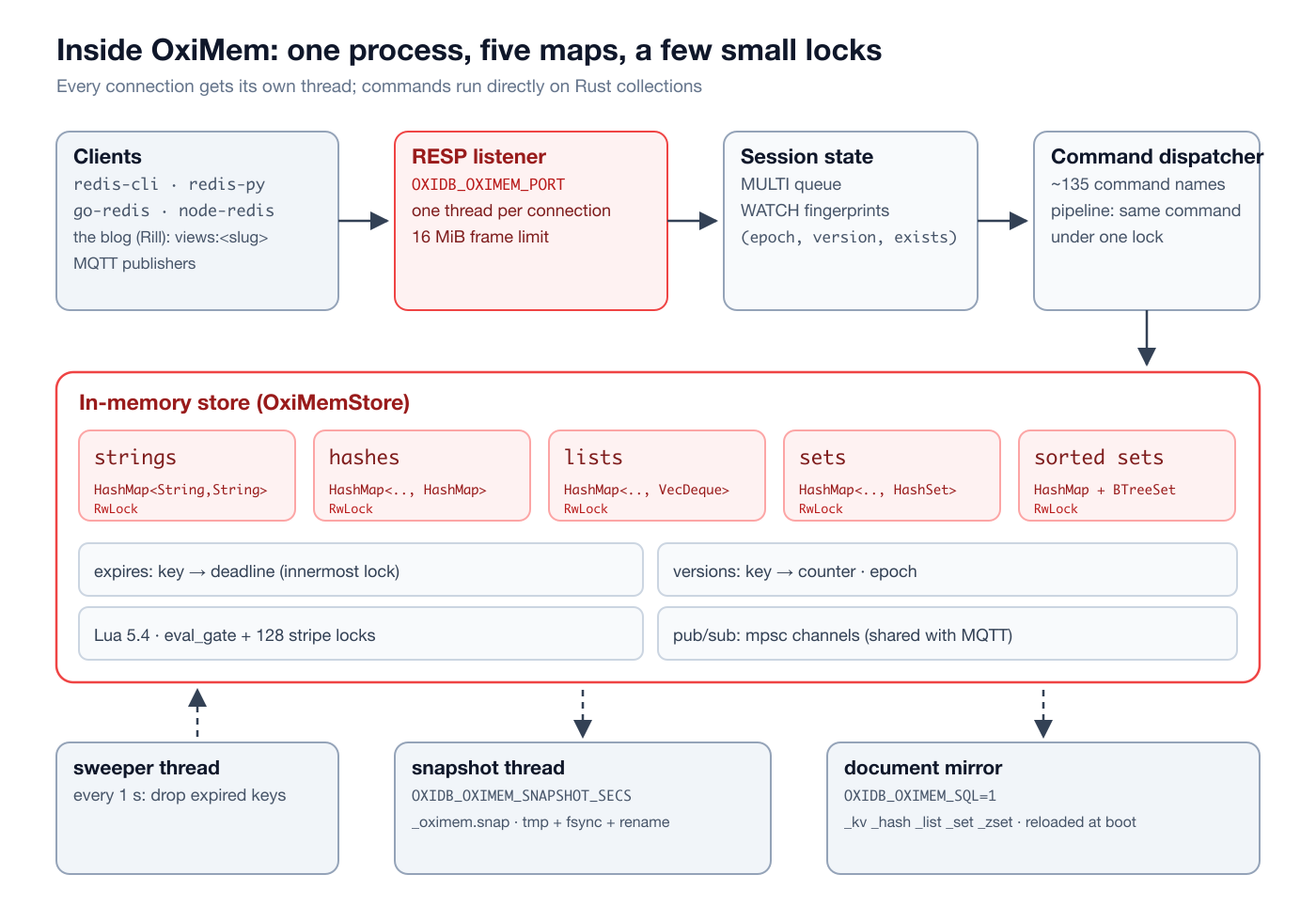
All of it is in oxidb-server/src/oximem.rs, about 6,700 lines. The core struct is OxiMemStore:
pub struct OxiMemStore {
    strings: RwLock<HashMap<String, KvEntry>>,
    hashes: RwLock<HashMap<String, HashMap<String, String>>>,
    lists: RwLock<HashMap<String, VecDeque<String>>>,
    sets: RwLock<HashMap<String, HashSet<String>>>,
    sorted_sets: RwLock<HashMap<String, SortedSet>>,
    expires: RwLock<HashMap<String, Instant>>,
    // pubsub, psubs, tx_lock, eval_gate, eval_stripes, versions, epoch, ...
}
No JSON, no WAL, no indexes: commands work directly on standard Rust collections.
Connection model. Every TCP connection gets its own OS thread (with TCP_NODELAY). The thread reads RESP values and executes them through a per-connection Session (MULTI queue, WATCH list). Unlike Redis's single-threaded event loop, different connections really run in parallel here, and the five type maps sit behind separate RwLocks: a GET and an HSET don't wait for each other.
Pipeline fast path. When several commands are sitting in the read buffer (the client is pipelining), they are taken as a batch. If every command in the batch is the same and it is GET, SET, INCR, LPUSH, RPUSH, HSET or PING, the relevant lock is taken once and the whole batch runs under it; replies go out with a single flush. Mixed batches or batches with transaction commands run one by one on the stateful path. That is why ZADD falls behind when pipelined in the benchmark below: it isn't on the fast-path list.
Lock order. The expires map is the innermost lock. It may be taken while a type map is held, but a type map is never taken while expires is held. Every deadline-changing command first establishes existence in the type maps and then writes to expires, so the order falls out naturally. The code repeats this rule as a comment at every critical spot, because the result of breaking it once is a rare deadlock that is very hard to catch.
Sorted sets. HashMap<String, f64> + BTreeSet<(Score, String)>. Insert and remove are O(log n), score lookup O(1), ranges an ordered walk of the tree. The weak spot: ZRANK counts from the start of the tree, so it is O(n). Redis's skip list stores span widths in each node and does it in O(log n). If you call ZRANK a lot on a set with millions of members, you will notice.
Memory. I measured this too. I started both servers fresh and loaded each with a million SET key:NNNNNNN <32-byte value> through redis-cli --pipe:
| RSS at start | RSS after 1M keys | Growth | Per key | |
|---|---|---|---|---|
| Redis 8.6.1 | 6.8 MB | 107.9 MB | 101 MB | ~101 bytes |
| OxiDB 0.44.2 (OxiMem) | 14.6 MB | 169.6 MB | 155 MB | ~155 bytes |
OxiMem uses about 1.5x as much memory as Redis for the same data. The reason is clear: each key is a separate String (a 24-byte header plus its own heap allocation), so is each value, plus the HashMap entry. Redis uses embedded encodings (embstr) and compact structures for small strings. OxiMem's starting RSS is higher too, because this process is also a full document database. There is no maxmemory limit or LRU eviction either: if memory fills up, the process keeps growing. Bounding the size is up to you (TTLs, key counts).
One keyspace. OxiDB is a multi-database engine, but OxiMem's keyspace is deliberately global (ADR-0012). SELECT 3 returns OK and does nothing; whichever database you are on, you write to the same keyspace. Session tokens and counters don't care about logical database boundaries; if you want separation, use key prefixes (customer:7:session:abc). In cluster mode OxiMem is not replicated through Raft either; each node has its own keyspace.
The command surface
The README says "50+ commands"; that is now far too modest. The dispatcher knows about 135 command names:
| Family | Commands |
|---|---|
| Connection / server | PING ECHO QUIT SELECT AUTH HELLO CLIENT COMMAND INFO CONFIG DBSIZE FLUSHDB FLUSHALL |
| Strings | SET (EX/PX/NX/XX) GET GETSET SETNX SETEX PSETEX MSET MGET APPEND STRLEN GETRANGE SETRANGE GETDEL GETEX |
| Counters | INCR DECR INCRBY DECRBY INCRBYFLOAT DECRBYFLOATGE |
| Bits | SETBIT GETBIT BITCOUNT |
| Keys / TTL | DEL EXISTS TYPE KEYS SCAN RANDOMKEY RENAME COPY EXPIRE PEXPIRE EXPIREAT PEXPIREAT PERSIST TTL PTTL |
| Hashes | HSET HMSET HSETNX HGET HMGET HGETALL HDEL HEXISTS HKEYS HVALS HLEN HINCRBY HRANDFIELD HSCAN |
| Lists | LPUSH RPUSH LPOP RPOP LLEN LRANGE LINDEX LSET LREM LTRIM LMOVE RPOPLPUSH LMPOP |
| Sets | SADD SREM SMEMBERS SISMEMBER SMISMEMBER SCARD SPOP SRANDMEMBER SINTER SUNION SDIFF SINTERSTORE SUNIONSTORE SDIFFSTORE SSCAN |
| Sorted sets | ZADD ZREM ZSCORE ZCARD ZCOUNT ZINCRBY ZRANK ZREVRANK ZRANGE ZREVRANGE ZRANGEBYSCORE ZREVRANGEBYSCORE ZRANGEBYLEX ZPOPMIN ZPOPMAX ZREMRANGEBYRANK ZREMRANGEBYSCORE ZUNIONSTORE ZINTERSTORE ZMPOP ZSCAN |
| GEO | GEOADD GEOPOS GEODIST GEOHASH GEOSEARCH |
| Blocking | BLPOP BRPOP BZPOPMIN BLMOVE BRPOPLPUSH |
| Pub/Sub | PUBLISH SUBSCRIBE PSUBSCRIBE UNSUBSCRIBE PUNSUBSCRIBE |
| Transactions | MULTI EXEC DISCARD WATCH UNWATCH |
| Scripting | EVAL EVALSHA SCRIPT (LOAD, EXISTS, FLUSH, KILL) |
What is missing matters too. Commands I tried that returned unknown command: UNLINK, MSETNX, HINCRBYFLOAT, ZRANGESTORE, OBJECT, WAIT, SAVE, BGSAVE. No streams (the XADD family), no HyperLogLog (PFADD), no ACL, SLOWLOG or MEMORY. CONFIG is mostly a shell: only notify-keyspace-events actually does something; other CONFIG GET calls return an empty value and CONFIG SET returns OK. AUTH, SELECT, CLIENT and COMMAND answer OK so client handshakes don't break.
INFO is short as well:
# Server
oxidb_version:0.44.2
oximem_mode:raw
resp_compat:true

# Keyspace
db0:keys=19,expires=0
Performance against Redis
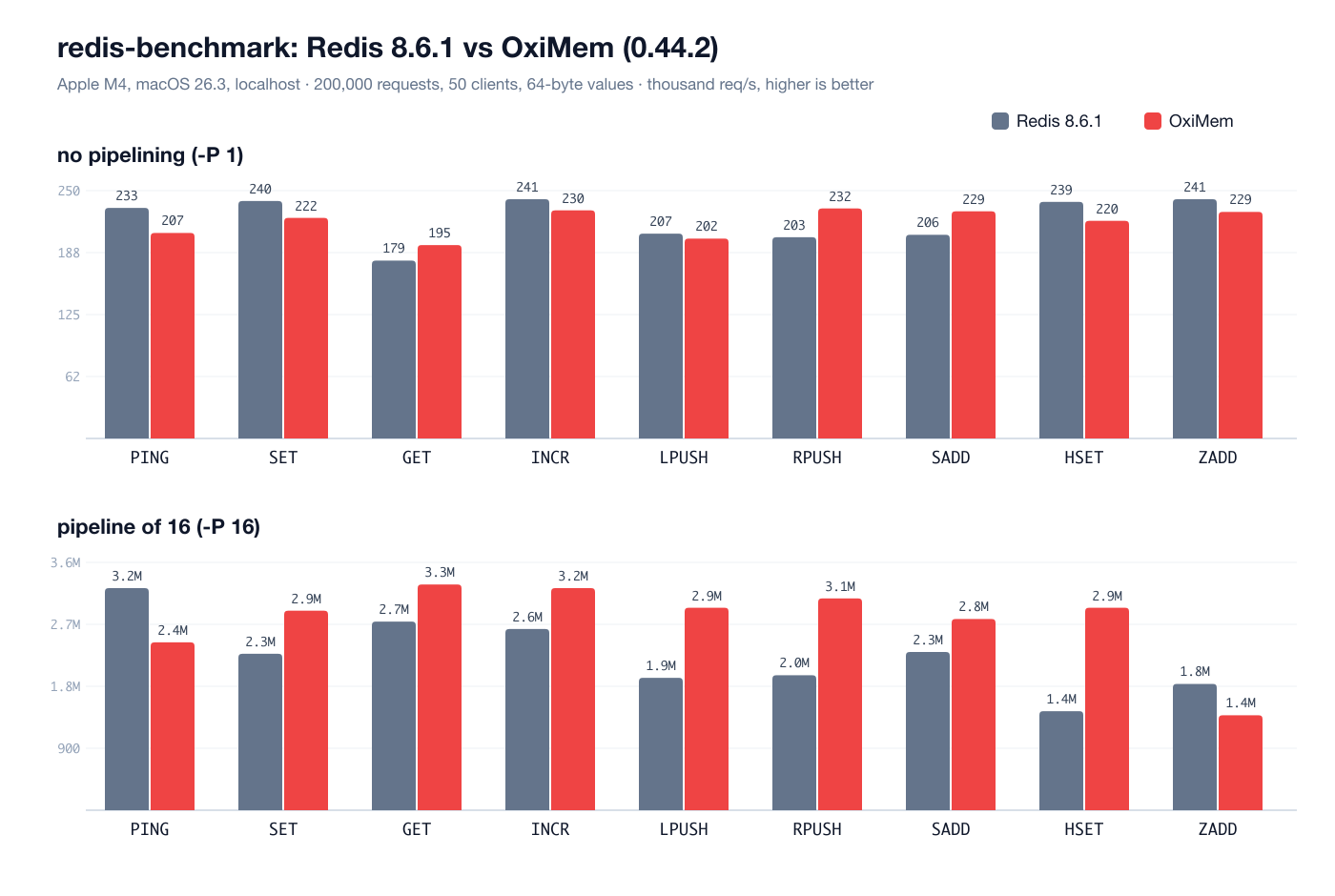
The only meaningful yardstick for a Redis-compatible layer is Redis itself. On the same machine (Apple M4, 10 cores, 24 GB, macOS 26.3) I ran Redis 8.6.1 from Homebrew (--save "" --appendonly no, so no persistence) next to OxiMem in fast mode. Both on localhost, measured with redis-benchmark 8.6.1: 200,000 requests, 50 clients, 64-byte values, first without pipelining, then with a pipeline of 16.
How to read it:
- Without pipelining (-P 1) both servers sit in the 180k to 245k requests per second band and the differences are noise. On a second run the order flipped for some commands: Redis
GETwent from 179k to 239k, OxiMemINCRdropped from 230k to 185k. In this mode the bottleneck is the localhost round trip, not the server. - With pipelining (-P 16) OxiMem leads on most commands (
SET2.9M vs 2.3M,HSET2.9M vs 1.4M). The reasons are the two things described above: 50 connections run in parallel on separate threads, and batches of the same command run under one lock. Redis stays on one thread. The second run showed the same picture. - Where it trails:
PING(2.4M vs 3.2M) and especiallyZADD(1.4M vs 1.8M; 1.35M vs 2.0M on the second run).ZADDisn't on the pipeline fast path, so each command goes through the dispatcher on its own.MSET(10 keys) also trails when pipelined (393k vs 473k). - These are one or two runs per configuration on one machine over localhost. A real network, a different core count or a different load will change the numbers. In particular I did not turn on Redis's threaded I/O (
io-threads).
In short: in raw speed OxiMem is in the same league as Redis and uses multiple cores better; in exchange it spends more memory. For me, though, the real win is not the numbers but that this speed lives in the same process, right next to the document and SQL engines: no separate Redis to install, monitor and upgrade.
Limits and honest trade-offs
Not knowing a tool's limits is the quickest way to use it in the wrong place. OxiMem's limits today:
No cross-type WRONGTYPE check. Because the five types live in separate maps, one name can be a string and a set at the same time. In Redis, INCR on a set fails with WRONGTYPE; in OxiMem it creates a string alongside:
127.0.0.1:15602> INCR online
(integer) 1
127.0.0.1:15602> TYPE online
string
127.0.0.1:15602> SCARD online
(integer) 3
127.0.0.1:15602> DEL online
(integer) 1
127.0.0.1:15602> EXISTS online
(integer) 1
DEL removed the string, but the set is still there. Prefixing key names with their type (set:online, cnt:online) avoids it in practice, but someone coming from Redis won't expect it. It is an incompatibility that needs fixing.
No authentication, and the listener is on every interface. AUTH says OK to anything. OxiDB's SCRAM authentication and role-based access control don't cover the OxiMem port. Since the port binds 0.0.0.0, there is only one correct way to run it: firewall the OxiMem port off from the outside, and reach it only from the same machine or a trusted private network. That is how this blog runs it. Authentication is the most important gap in this layer.
No RESP3. HELLO 3 gets an error; some clients (redis-py 8) need protocol=2 for that.
Error prefixes. NOSCRIPT, EXECABORT and NOPROTO arrive prefixed with ERR, so client logic keyed on those codes (like redis-py's register_script) doesn't trigger.
No lossless persistence. No AOF-style log, no final snapshot on shutdown. The document mirror is durable but very slow for writes.
No memory limit or eviction, and ~1.5x Redis's memory. No replication: the keyspace is node-local.
So when OxiMem and when something else? One question decides it: what happens if I lose this data? If the answer is "nothing, it is recomputed or short-lived anyway" (sessions, caches, counters, rate limits, short queues, live prices), OxiMem is the place. If the answer is "I lose money, my audit trail has a gap", it belongs in the document engine, the SQL engine or the ledger engine. The strongest setup uses both: a fast hot path and a durable cold path.
OxiMem on this blog
This blog's server is written in Rill and talks to OxiDB over three protocols: the native protocol for posts and tags (SQL and documents), S3 for images, and RESP for hot data. What lives in OxiMem:
- View counters. When a post is opened, the server runs
INCR views:<slug>and puts the returned number in place of a placeholder in the page. So the number at the bottom of this page came from OxiMem at that very moment. Bots don't increment it; they only read it withGET. - Page cache. Rendered HTML sits under
page:<lang>:post:<slug>keys with a five-minute lifetime (SETEX ... 300). If it is in the cache, the page goes out straight from there with anX-Cache: hitheader; otherwise it is rendered from SQL and written to OxiMem. When a post is edited, every page key is dropped withKEYS page:*; a blog is written rarely and read often, so that is cheap enough. - Sessions and rate limiting. The admin session is a
sess:<token>key with a seven-day lifetime. Comments and login attempts go through a fixed-window rate limit: when the firstINCRreturns 1, the key gets the window length withEXPIRE, a count over the limit is refused, and the key dies on its own when the window ends.
Detailed analytics are not in OxiMem: every view is also written, on its own strand (Rill's lightweight thread), to the events collection in the document engine. That way the page doesn't wait for the document engine's fsync, but the analytics are durable. The total view count in the admin panel comes from counting that collection, not from OxiMem. Even if the OxiMem counter is lost in a restart, the real record stays in events. It is a live example of this post's question, "what if I lose this data?": the fast number in OxiMem, the record of truth in the document engine.
Try it
OxiDB is a single binary. Download oxidb-server for your platform from the GitHub releases page or build a Docker image from the repo's Dockerfile, then:
OXIDB_OXIMEM_PORT=6380 OXIDB_OXIMEM_SNAPSHOT_SECS=30 ./oxidb-server
redis-cli -p 6380 PING
Any Redis client you already have should work (with protocol=2 for redis-py 8). The next items on my list are clear: a cross-type WRONGTYPE check, error codes without the ERR prefix, fixing multi-line Lua errors, a final snapshot on shutdown and authentication. The next post in the series covers OxiDB's S3-compatible object storage.